How Software Integration Works: 10 Proven Best Rules in 2026

Let’s be honest: almost no modern business runs on a single app anymore.
On any given workday, your team might check emails in Google Workspace, chat on Slack, track sales leads in HubSpot, send invoices through QuickBooks, and collect payments via Stripe.
It feels great to have a specialized tool for everything—until you realize none of them talk to each other.
That’s where the headache begins: manual copy-pasting, missed customer details, and messy spreadsheets. The fix isn’t buying more software; it’s understanding how software integration works so your apps can start talking behind the scenes.
In 2026, you don’t need a computer science degree to build connected workflows. Thanks to modern APIs, instant webhooks, and visual no-code builders, learning how software integration works gives startups, remote teams, and small business owners the power to automate their daily routines without hiring an expensive engineering agency.
Quick Insight: Think of software integration as digital plumbing. When built correctly, data flows smoothly from one app to another without a single drop being spilled.
What Is Software Integration and Why Does It Matter?
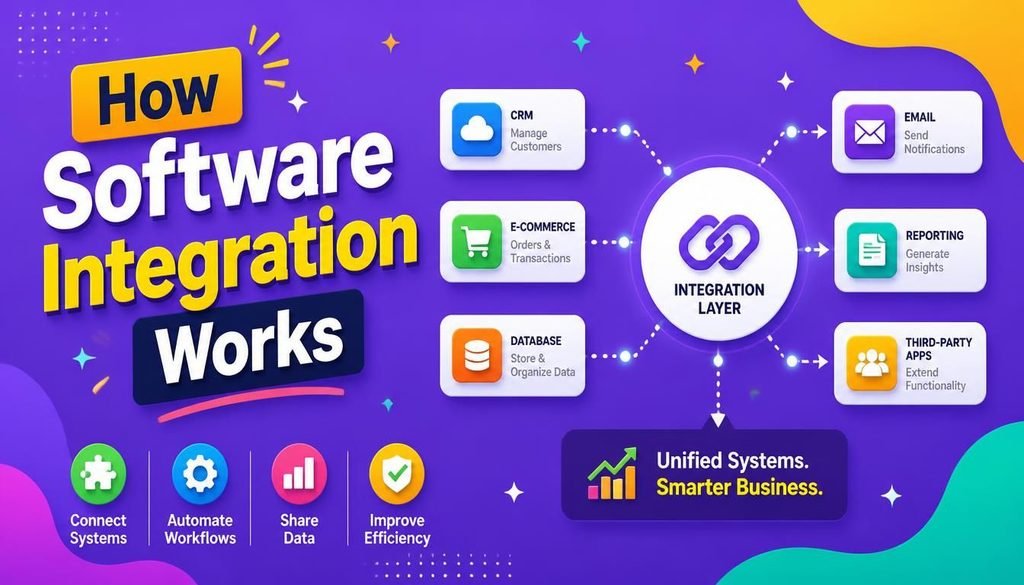
Strip away the technical jargon, and understanding how software integration works comes down to one clear concept: connecting independent apps so they automatically share data and trigger actions for you.
Instead of having an employee manually type new lead details from a website form into your CRM, then copy that customer into accounting, an integrated setup moves that data instantly in the background.
┌─────────────────────────────────────────────────────────────┐
│                 Integrated Data Pipeline                    │
├──────────────────┬──────────────────┬───────────────────────┤
│ Web Form         │ Automated Bridge │ Destination Systems   │
│ (Customer Data)  │ (API / Webhook)  │ (CRM, Invoice, Slack) │
└──────────────────┴──────────────────┴───────────────────────┘
When you master how software integration works in your day-to-day operations, four immediate wins follow:
- No More Manual Data Entry: You get back hours of wasted team labor every single week.
- Fewer Costly Typos: Computers don’t accidentally swap phone digits or miss email fields.
- Lightning-Fast Responses: Leads get welcome messages and receipts within seconds, not hours.
- One Single Source of Truth: Every department looks at the exact same, up-to-date customer records.
The 4 Core Technologies Behind Modern Integration
To get a practical grip on how software integration works behind the curtain, let’s break down the four main tools connecting modern cloud platforms today.
┌─────────────────────────────────────────────────────────────┐
│              Primary Integration Technologies                │
├─────────────────────────────────────────────────────────────┤
│ • APIs: Request-and-Response Gateway (Polling)              │
│ • Webhooks: Instant Event-Driven Push Notifications         │
│ • No-Code Platforms: Visual Drag-and-Drop Workflow Builders  │
│ • Database Connectors: Direct SQL & Native SaaS Bridges     │
└─────────────────────────────────────────────────────────────┘
1. Application Programming Interfaces (APIs)
An API is the backbone of how software integration works. Think of an API as a digital waiter in a restaurant. You (App A) place an order from the menu, the waiter takes it to the kitchen (App B), and brings back your meal in a neat format (usually JSON).
  [ Your Web App ]  ──( REST API Request )──>  [ CRM Database ]
  [ Your Web App ]  <──( JSON Response Data )──  [ CRM Database ]
APIs allow apps to query databases, push updates, and talk securely behind authorization gates.
2. Webhooks (Real-Time Push Alerts)
While traditional APIs show how software integration works through “polling” (where one app keeps knocking on another app’s door asking, “Any new data yet?”), webhooks do the opposite.
- APIs (Polling): “Got any new orders yet?” (Asked every 5 minutes)
- Webhooks (Event-Driven): “A customer just paid! Here are the details.” (Pushed instantly)
If you need instant updates—like alerting your team when a payment succeeds—webhooks are your best friend.
3. No-Code Automation Platforms
If you can’t write code, don’t worry. No-code tools are the friendliest way to learn how software integration works visually. They connect apps using simple trigger-and-action steps:
- Zapier: Perfect for straight-forward, multi-app sequences.
- Make: Best for complex visual workflows with branching logic.
- Microsoft Power Automate: Designed for deep integration within the Microsoft enterprise universe.
Curious how these stack up? Check out our hands-on guide to Easy Workflow Automation Tools.
4. Native Connectors and Database Syncs
Many popular platforms now come with one-click connectors that simplify how software integration works for beginners (like syncing Shopify to Mailchimp in two clicks). For heavy data processing, developers connect software directly to SQL warehouses.
If you ever need pre-built code snippets or API documentation, tech communities on GitHub offer thousands of free resources to speed up your setup.
10 Golden Rules for Software Integration in 2026
Before you start connecting your apps, keep these 10 battle-tested rules in mind so your setups stay reliable, safe, and easy to fix:
- Draw the Path First: Sketch out what triggers the workflow, what data moves, and where it ends up before building.
- Clean Up Your Data Formatting: Make sure date fields, phone formats, and names match between apps (e.g.,
YYYY-MM-DD). - Limit Access Rights: Only give an API integration permission to read or edit the specific fields it actually needs.
- Encrypt Everything in Transit: Ensure every webhook URL and API call uses secure HTTPS/TLS links.
- Hide Your API Keys: Never share secret keys publicly or hardcode them into exposed scripts.
- Plan for Failures: Set up automatic email or Slack alerts so you know immediately if a connection drops.
- Always Test in a Sandbox: Run test rounds with test data before touching your live customer database.
- Watch Out for Rate Limits: Don’t overload free API tiers with thousands of requests all at once.
- Document Your Workflows: Keep a simple document listing who owns which API key and what each webhook does.
- Clean House Every Quarter: Regularly revoke permissions for old tools, browser extensions, or test zaps you no longer use.
Real-World Examples: Seeing It in Action
Let’s look at how understanding how software integration works changes day-to-day business operations across real teams:
1. E-Commerce and Order Handling
When a customer buys something on your website, an integrated workflow springs to life:
- Your storefront accepts payment through a Stripe API.
- The order instantly creates a customer profile in your CRM.
- Inventory numbers automatically decrease in your warehouse app.
- A confirmation email with a tracking link lands in the customer’s inbox.
2. Turning Form Fills into Sales Calls
When a prospect fills out a contact form on your site:
- The form sends a webhook notification straight to your CRM.
- A new sales deal opens and gets assigned to an online sales rep.
- A quick alert pops up in your team’s Slack channel.
- An automated welcome email goes out to the prospect instantly.
To make sure you’re picking software that fits your exact workflow before connecting them, read our breakdown on How to Choose Software.
Keeping Your Data Safe While Integrating
Knowing how software integration works isn’t just about speed—it’s also about keeping your business data safe. Opening doors between software tools means making sure unwanted visitors can’t walk through them.
Official cybersecurity guidance from the Cybersecurity and Infrastructure Security Agency (CISA) emphasizes that third-party integrations must enforce strict user authentication and least-privilege API permissions.
┌─────────────────────────────────────────────────────────────┐
│             4-Layer Integration Security Protocol           │
├─────────────────────────────────────────────────────────────┤
│ 1. Enforce Multi-Factor Authentication (MFA) on all tools   │
│ 2. Use OAuth 2.0 and encrypted API tokens (Never share pass) │
│ 3. Apply Principle of Least Privilege (Limit data scope)    │
│ 4. Audit connected apps and revoke unused third-party tokens│
└─────────────────────────────────────────────────────────────┘
Follow these practical steps when building out how software integration works in your business:
- Lock Down API Credentials: Use secure business password managers to store tokens. For best practices, read our guide on How to Create and Manage Strong Passwords.
- Stick to Minimum Permissions: Never give a simple email tool full administrative access to your core database.
- Review Access Frequently: Revoke third-party access for tools your team stopped using months ago.
For a deeper dive into securing your cloud software stack, explore our quick tutorial on Easy SaaS Security Rules.
Before committing to paid software plans to access API features, check out our Simple SaaS Pricing Guide, or browse curated suites that play well together in our review of the Top SaaS Tools 2026.
Quick Comparison: Which Integration Method Do You Need?
| Method | Tech Level Needed | Speed | Best Suited For |
| Native Connectors | Low (Plug-and-play) | Instant or Scheduled | Standard everyday SaaS tools |
| No-Code Automation | Low to Moderate | Instant or Polled | Non-technical business teams |
| REST APIs | Moderate to High | On-Demand | Custom applications & custom logic |
| Webhooks | Moderate to High | Instant Event Push | Real-time alerts and payment events |
| Database Sync | High (SQL required) | Scheduled or Live | Advanced business analytics |
Practical Checklist: Planning Your First Pipeline
Use this practical checklist to guide how software integration works when setting up your next automation:
| Step | What to Do | Done? |
| Workflow Mapping | Map out the trigger app, the data being moved, and the final action | ☐ |
| Field Matching | Align field names across apps (e.g., matching first_name to First Name) | ☐ |
| Sandbox Testing | Test with sample/dummy data before connecting to live databases | ☐ |
| Error Handling | Set up automated email or chat alerts if a run fails or hits an error | ☐ |
| Documentation | Jot down active webhook links, API owners, and data rules in an internal doc | ☐ |
Final Thoughts
At the end of the day, understanding how software integration works gives you back your most valuable asset: time. By connecting your tools with APIs, webhooks, or simple no-code builders, you turn scattered apps into a synchronized business machine.
Start small. Pick two apps you use every day—like your website contact form and your CRM—and connect them. Practice strict security, test your workflows, and gradually automate the repetitive tasks holding your business back in 2026.
Frequently Asked Questions (FAQs)
What is the simplest way to explain how software integration works?
In plain terms, how software integration works comes down to one app sending structured data through an API or webhook to automatically trigger an action inside another app without human intervention.
What’s the practical difference between an API and a webhook?
An API lets your system request data whenever it needs it (asking questions), while a webhook shows how software integration works in real-time by automatically sending data the moment an event happens (sending answers instantly).
Can I build software integrations if I don’t know how to code?
Absolutely. Modern no-code platforms like Zapier and Make let anyone build powerful integrations using simple drag-and-drop interfaces without touching a single line of code.
What’s Your Favorite Workflow?
Which apps are running your business right now? Have you tried setting up no-code zaps or custom APIs, or are you still dealing with manual copy-pasting? Drop your thoughts, questions, or setup ideas in the comments below!




8 Comments