10 Best Free Small Business Cybersecurity Audit Checklist Steps (2026)

Cybersecurity can feel overwhelmingly complex when you run a modern enterprise or growing company. Everyday business operations rely heavily on custom cloud storage, corporate email accounts, customer payment processing portals, employee laptops, and specialized software tools. The challenge is that a single weak password, an unpatched workstation, or a missing backup can expose your entire operation to catastrophic data breaches and costly operational downtime. Following a structured small business cybersecurity audit checklist is essential to identify vulnerabilities before attackers do.
The good news is that you do not need a massive enterprise IT budget or a full-scale Security Operations Center (SOC) to drastically improve your security posture.
Executing a structured assessment using a small business cybersecurity audit checklist enables founders, IT leads, and managers to systematically evaluate current security controls, uncover vulnerable access vectors, and prioritize remediation tasks.
This comprehensive, step-by-step guide provides a free, practical framework for reviewing your company’s digital perimeter. Based on modern risk management principles from the NIST Cybersecurity Framework (Govern, Identify, Protect, Detect, Respond, and Recover), this guide delivers an actionable small business cybersecurity audit checklist to protect your critical business assets in 2026.
What Is a Small Business Cybersecurity Audit?
A cybersecurity audit is a structured evaluation of your business’s technical controls, account privileges, device hardware, software tools, and data handling policies. By working through a small business cybersecurity audit checklist, companies gain complete visibility into their digital threat landscape.
┌─────────────────────────────────────────────────────────────┐
│                 Cybersecurity Audit Objectives              │
├──────────────────┬──────────────────┬───────────────────────┤
│ Asset Inventory  │ Access Controls  │ Incident Preparedness │
│ Software & Devices│ MFA & Passwords  │ Backup Verification   │
└──────────────────┴──────────────────┴───────────────────────┘
The primary objective of using a small business cybersecurity audit checklist is to answer critical security questions directly:
- Asset Identification: What sensitive customer data, financial records, and intellectual property must we protect?
- Device Mapping: Which physical laptops, smartphones, and network routers connect to corporate infrastructure?
- Identity Management: Who holds administrator access to core cloud applications and primary domain hosting accounts?
- Access Hardening: Are unique passwords and phishing-resistant multi-factor authentication (MFA) strictly enforced?
- Continuity Planning: Do we maintain encrypted, tested offline backups capable of surviving ransomware attacks?
Rather than attempting an overly complex enterprise audit, your goal when completing this small business cybersecurity audit checklist is to identify high-risk vulnerabilities and remediate low-hanging security gaps immediately.
Step-by-Step Scoring System for Your Cybersecurity Audit
Before executing your small business cybersecurity audit checklist, establish a simple, quantitative scoring system to measure your organization’s readiness across various operational domains.
Evaluate every item on the checklist using a three-tier scoring model:
- Yes (2 Points): Fully implemented, verified, and routinely maintained.
- Partly (1 Point): Partially implemented but lacks formal enforcement or regular testing.
- No (0 Points): Not currently implemented or completely neglected.
┌─────────────────────────────────────────────────────────────┐
│                   Audit Scoring Matrix                      │
├──────────────────────┼──────────────────┼───────────────────┤
│ Implementation Level │ Assigned Score   │ Action Needed     │
├──────────────────────┼──────────────────┼───────────────────┤
│ Yes                  │ 2 Points         │ Maintain & Review │
│ Partly               │ 1 Point          │ Upgrade & Enforce │
│ No                   │ 0 Points         │ Immediate Fix     │
└──────────────────────┴──────────────────┴───────────────────┘
Total your points at the end of your small business cybersecurity audit checklist evaluation to highlight critical security gaps that require immediate technical intervention.
Comprehensive Small Business Cybersecurity Audit Checklist
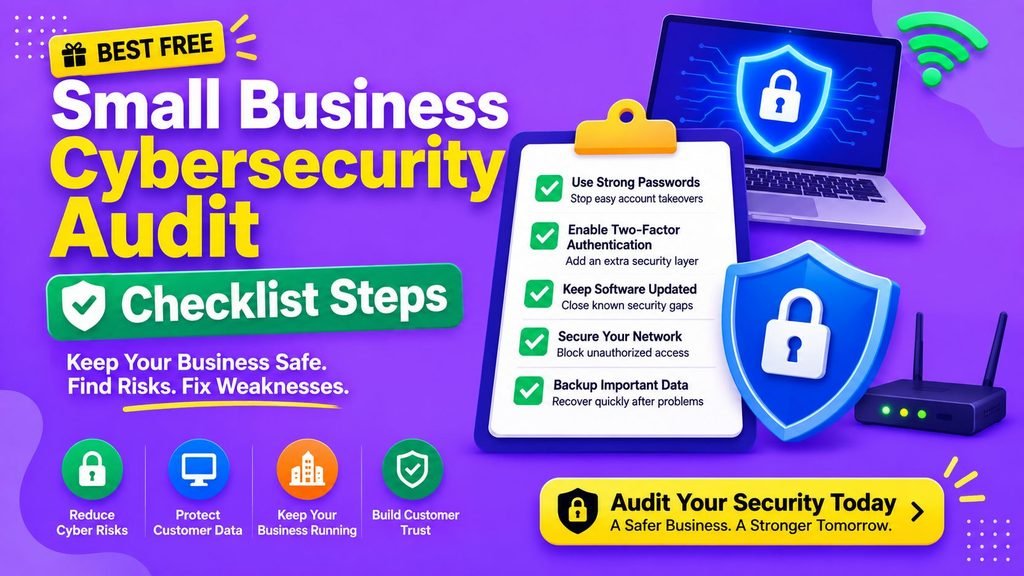
Execute these 10 structured audit categories to systematically evaluate and harden your organization’s digital posture using our small business cybersecurity audit checklist:
1. Business Asset Inventory Mapping
You cannot defend what you do not track. Creating a centralized inventory of hardware and digital infrastructure is the foundational step of any small business cybersecurity audit checklist.
- [ ] Maintain an updated hardware registry detailing all business laptops, desktops, tablets, and mobile devices.
- [ ] Identify all cloud storage environments (Google Drive, OneDrive, Dropbox, AWS S3 buckets).
- [ ] Log all corporate SaaS software subscriptions, domain hosts, and website databases.
- [ ] Document where customer personally identifiable information (PII) and financial records reside.
- [ ] Assign a dedicated internal owner responsible for managing and reviewing each primary business system.
2. Password Security and Governance
Stolen or credential-stuffed passwords remain a top initial access vector used by cybercriminals, making credential audits an essential part of the small business cybersecurity audit checklist.
- [ ] Enforce unique, high-entropy passwords across every employee account and third-party SaaS tool.
- [ ] Ban password sharing via unencrypted channels such as email, Slack, or SMS text messages.
- [ ] Immediately replace default admin credentials on all hardware routers, firewalls, and network switches.
- [ ] Mandate the use of an enterprise-grade password manager (such as Bitwarden or 1Password).
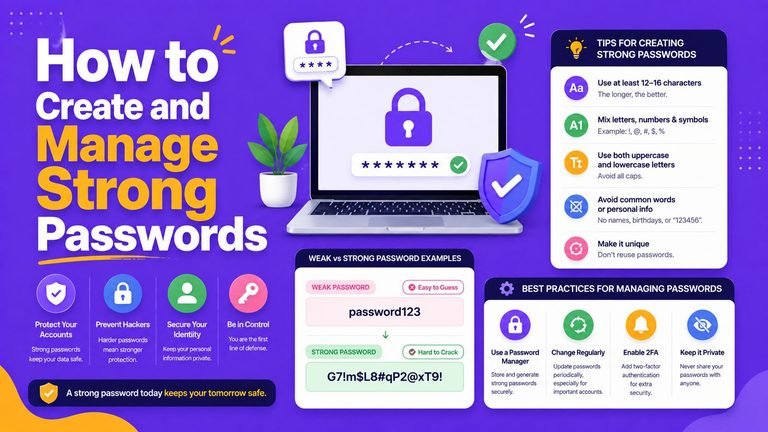
- [ ] Review credential practices using our master tutorial on How to Create and Manage Strong Passwords.
3. Multi-Factor Authentication (MFA) Enforcement
Implementing multi-factor authentication provides immediate defense against remote credential theft and automated bot attacks.
- [ ] Enforce mandatory MFA on primary corporate email accounts (Google Workspace / Microsoft 365).
- [ ] Require non-SMS MFA (authenticator apps or hardware keys) on financial portals, SaaS management panels, and cloud storage.
- [ ] Transition key personnel from SMS verification codes to hardware keys or passkeys. Learn the exact process in our detailed guide on How to Set Up Two-Factor Authentication.
- [ ] Secure emergency backup authentication recovery codes in an encrypted offline vault.
4. Least-Privilege User Access Control
Grant employees access only to the exact systems required to perform their daily duties as recommended in every modern small business cybersecurity audit checklist.
- [ ] Restrict global administrator privileges to designated IT security personnel.
- [ ] Ensure every staff member logs into workstations using an individual, non-shared user account.
- [ ] Audit contractor and third-party vendor access controls, setting explicit expiration dates.
- [ ] Establish an offboarding protocol that instantly revokes system access when employees leave the company.
5. Endpoint and Device Hardware Hardening
Every workstation or mobile phone connected to corporate networks represents a potential entry point for malicious code.
- [ ] Enable automatic operating system security updates across all Windows PCs, MacBooks, and smartphones.
- [ ] Enforce full-disk encryption (BitLocker for Windows / FileVault for Mac) on all employee laptops.
- [ ] Verify that real-time antivirus protection is active. Learn how to isolate and clean infected endpoints in our walkthrough on how to Remove Malware From Windows and Mac.
- [ ] Apply foundational endpoint security practices outlined in our manual on Simple Cybersecurity Tips.
6. SaaS Application and Software Auditing
Shadow IT—unapproved applications used by staff without administrative oversight—introduces untracked vulnerabilities into your business network.
- [ ] Audit all active cloud apps and terminate subscriptions for unused or abandoned SaaS accounts.
- [ ] Verify that third-party software integrations use secure authorization tokens instead of stored passwords.
- [ ] Review API integration permissions using our framework on How Software Integration Works.
- [ ] Establish centralized software procurement policies using our operational framework on How to Choose Software.
7. Network and Wi-Fi Boundary Defense
Securing your internal network perimeter blocks unauthorized eavesdropping and automated lateral movement by attackers.
- [ ] Secure local Wi-Fi networks using WPA3 or WPA2 Enterprise encryption with strong passphrases.
- [ ] Isolate corporate devices from guest visitors by placing guests on a dedicated, segmented Wi-Fi network.
- [ ] Secure perimeter network boundaries following our analysis on 10 Best Ways Next Generation Firewall Protects Networks in 2026.
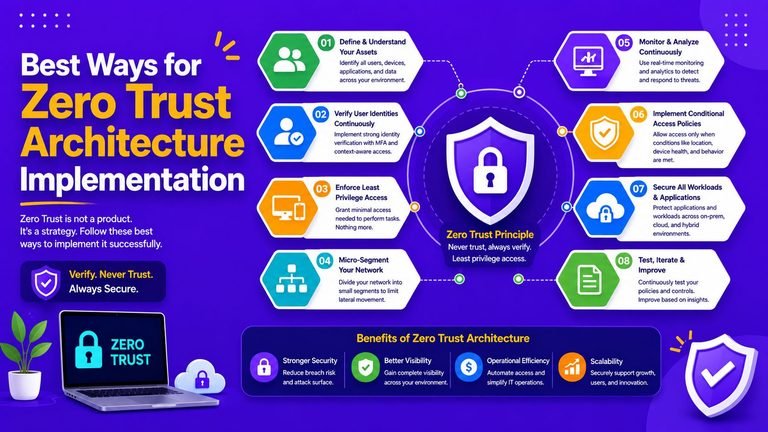
- [ ] Integrate identity-driven network access by implementing our roadmap for 10 Best Ways for Zero Trust Architecture Implementation in 2026.
- [ ] Master foundational perimeter security principles in our primer on Network Security Basics.
8. Immutable Backup and Data Recovery
Reliable, offline backups evaluated during your small business cybersecurity audit checklist review are your last line of defense against destructive ransomware and hardware failures.
- [ ] Maintain regular, automated backups of critical databases, accounting records, and client files.
- [ ] Store at least one backup copy offsite in an isolated, immutable (read-only) cloud vault or offline drive.
- [ ] Perform routine restoration test runs quarterly to verify that backups function properly when needed.
9. Email Phishing Defense and Staff Awareness
Phishing attempts and social engineering represent the most frequent threat vectors targeting small business employees.
- [ ] Train employees to recognize deceptive domains, urgent money transfer requests, and malicious attachments.
- [ ] Teach staff to spot sophisticated social engineering tactics using our guide on 10 Best Ways to Spot Advanced Email Phishing Scams.
- [ ] Implement SPF, DKIM, and DMARC DNS records to prevent bad actors from spoofing your domain name.
10. Incident Response and Emergency Preparedness
Knowing how to respond to an active security breach prevents minor incidents from escalating into total operational loss.
- [ ] Designate a clear internal incident coordinator to lead containment efforts during an emergency.
- [ ] Maintain an offline contact list containing key technical support leads, legal advisors, and cyber insurance brokers.
- [ ] Outline clear containment steps: network isolation, account suspension, log collection, and customer notification policies.
Complete Audit Scoring Matrix
Use this scorecard to review your small business cybersecurity audit checklist results and calculate your total security rating:
| Cybersecurity Category | Audit Rating (Yes / Partly / No) | Calculated Score (0 – 2) | Risk Priority Level |
| 1. Asset Inventory | High Priority | ||
| 2. Password Security | Critical Priority | ||
| 3. MFA Enforcement | Critical Priority | ||
| 4. User Access Control | High Priority | ||
| 5. Device Hardening | High Priority | ||
| 6. SaaS & Cloud Security | Medium Priority | ||
| 7. Network Security | High Priority | ||
| 8. Backups & Recovery | Critical Priority | ||
| 9. Phishing Defense | Critical Priority | ||
| 10. Incident Response | High Priority |
Interpreting Your Total Score:
- 16 – 20 Points (Low Risk): Excellent baseline posture. Continue conducting quarterly audits using this small business cybersecurity audit checklist and refining controls.
- 10 – 15 Points (Moderate Risk): Moderate security foundation. Immediately address categories marked “No” or “Partly” on your audit sheet.
- 0 – 9 Points (High Risk): Vulnerable posture. Prioritize enforcing MFA, securing backups, and hardening passwords right away.
Actionable 30-Day Cybersecurity Improvement Plan
Once you complete your small business cybersecurity audit checklist, follow this structured 30-day timeline to remediate identified gaps systematically:
┌─────────────────────────────────────────────────────────────┐
│                 30-Day Security Remediation                 │
├──────────────────┬──────────────────┬───────────────────────┤
│ Week 1: Asset    │ Week 2: Account  │ Week 3: Device        │
│ Inventory & Mapping│ Hardening (MFA) │ & Network Cleanup     │
└──────────────────┴──────────────────┴───────────────────────┘
- Week 1: Inventory & Asset Mapping: Document all laptops, server environments, SaaS tools, and sensitive data locations as outlined in your small business cybersecurity audit checklist. Remove unused apps and accounts.
- Week 2: Account Hardening: Deploy an enterprise password manager, mandate unique passwords, and enforce non-SMS MFA on every corporate email and banking account.
- Week 3: Device & Network Isolation: Apply pending OS patches, enable full-disk encryption, update Wi-Fi passwords, and separate guest Wi-Fi networks.
- Week 4: Backups & Incident Planning: Establish immutable offsite backups, conduct a live restoration test, and finalize your internal incident response playbook.
Budgeting for Security Infrastructure Tools
Managing cybersecurity expenses requires selecting scalable, cost-effective security tools suited for growing teams.
┌─────────────────────────────────────────────────────────────┐
│             Security Software Evaluation Checklist           │
├─────────────────────────────────────────────────────────────┤
│ 1. Prioritize centralized management and seamless MFA      │
│ 2. Verify per-user licensing flexibility without hidden fees │
│ 3. Choose cross-platform endpoint tools (Windows/Mac/iOS)   │
└─────────────────────────────────────────────────────────────┘
To compare subscription models for enterprise security software, review our Simple SaaS Pricing Guide.
To discover top-rated security platforms tailored for distributed teams, check our curated directory of the Top SaaS Tools 2026.
Final Thoughts
Completing a comprehensive small business cybersecurity audit checklist is one of the most effective, high-ROI investments you can make to protect your business. You do not need expensive security software to protect your company against modern threats—enforcing multi-factor authentication, applying software updates, managing user access, and keeping tested backups will neutralize the vast majority of automated attacks.
Start today: complete your asset inventory, score your security posture using our small business cybersecurity audit checklist matrix, and address your highest-priority risks over the next 30 days.
Frequently Asked Questions (FAQs)
How often should a small business perform a cybersecurity audit?
Small businesses should execute a comprehensive small business cybersecurity audit checklist at least twice a year. Additionally, run targeted mini-audits whenever you roll out new software tools, onboard remote staff, or undergo significant network changes.
Is a cybersecurity audit expensive for a small business?
No. Conducting an internal audit using a structured small business cybersecurity audit checklist costs nothing beyond the time invested by your team. Remediation actions—like enforcing MFA or applying updates—are usually free.
What is the single most important security control for a small business?
Enforcing multi-factor authentication (MFA)—specifically non-SMS methods like passkeys or authenticator apps—across all business emails and cloud infrastructure provides the highest level of protection against cyber threats.
Can cloud storage providers replace offline backups?
No. Standard cloud sync services (like Google Drive or OneDrive) automatically mirror local file deletions and ransomware encryption to the cloud. You must maintain dedicated, immutable, read-only backups that are isolated from your primary working environment.
Do small businesses really need an incident response plan?
Yes. Having a basic incident response plan ensures your team can isolate infected systems, revoke compromised accounts, and resume normal operations quickly during a security incident, minimizing downtime and data loss.
Share Your Experience
Have you executed a small business cybersecurity audit checklist for your business? What was the biggest security gap you uncovered during your review? Share your thoughts, setup tips, and security questions in the comments below!