Robotic Process Automation: The Easy Guide to RPA in 2026

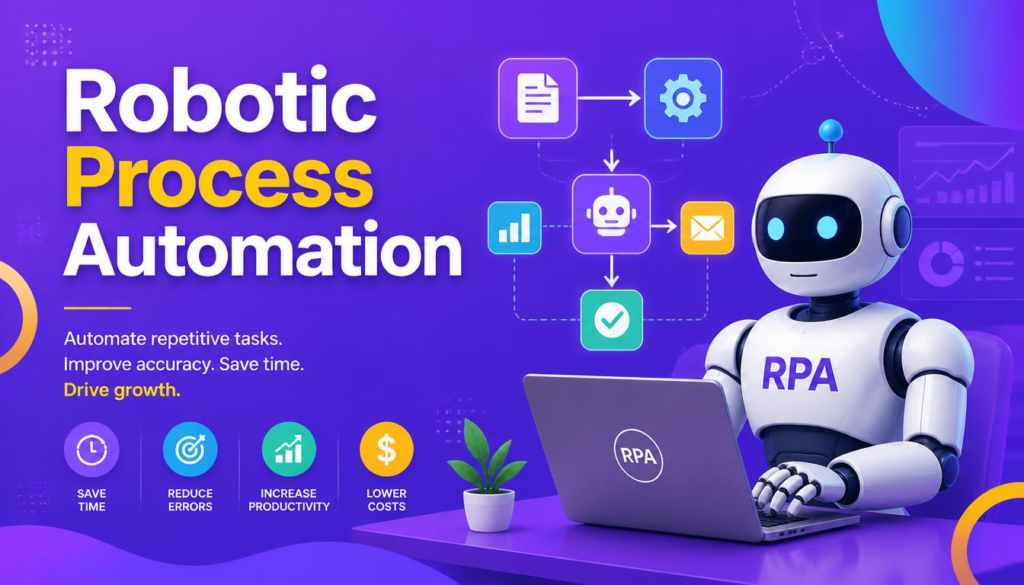
If you’ve ever worked an office job, you know the pain of soul-crushing admin tasks. Copying data from an email into a spreadsheet, downloading PDF invoices, manually updating customer records, or sending the exact same follow-up email fifty times a day—these tasks take up hours of our week. They are boring, exhausting, and worst of all, it’s remarkably easy for a tired human to make a tiny copy-paste mistake that ruins a whole report.
This is exactly where Robotic Process Automation comes to the rescue.
Instead of forcing real people to act like machines, Robotic Process Automation lets us build software “bots” to handle the mind-numbing digital chores. These software bots can log in, click buttons, copy text, and move files just like a person would—except they do it in seconds, never get tired, and don’t make typos.
In this guide, we’ll walk through what Robotic Process Automation actually is, how it works behind the scenes, where real companies are using it, and how you can bring it into your own workplace without the headache.
What Is Robotic Process Automation?
When people hear the word “robot,” they usually picture physical machines assembling cars in a factory. But in Robotic Process Automation (often called RPA), the “robots” are just smart software programs running inside your computer.
Think of an RPA bot as a virtual assistant that follows an exact checklist. Anything you do on your screen using a keyboard and mouse, a bot can be trained to do automatically.
┌─────────────────────────────────────────────────────────────┐
│                 Simple RPA Example Flow                     │
├─────────────────────────────────────────────────────────────┤
│ Receive Email ──> Bot Reads PDF ──> Updates CRM ──> Done    │
└─────────────────────────────────────────────────────────────┘
Here is a quick real-world scenario:
Imagine an employee named Sarah who manages client orders. Every morning, Sarah opens 30 different emails, downloads attached PDF receipts, types the order numbers into the company database, and emails the customer a confirmation.
With Robotic Process Automation, a software bot takes over this entire routine:
- It checks the inbox as soon as an email arrives.
- It reads the attached PDF and extracts the order number.
- It opens the database, pastes the information in the right boxes, and saves it.
- It sends out a polite confirmation email instantly.
Sarah doesn’t have to touch a thing. Instead, she can spend her morning actually talking to clients or solving real business problems.
How Does Robotic Process Automation Work?
You don’t need a PhD in computer science to understand how bots operate. At its core, Robotic Process Automation works by following clear rules created by humans.
Here is how a business typically sets up a bot from start to finish:
- Spot the Boring Task: Find a job that is repetitive, done frequently, and follows clear rules (like processing monthly invoices).
- Map Out the Steps: Write down every single click and keystroke needed to finish the task.
- Build the Bot: Use low-code tools like Microsoft Power Automate to visually drag and drop actions for the bot to follow.
- Run and Test: Let the bot run through real scenarios to make sure it doesn’t get confused by unexpected pop-ups.
- Set It Free: Schedule the bot to run automatically on a server, or let employees trigger it with a simple click.
The Three Main Types of RPA
Not every business task is the same, which is why Robotic Process Automation comes in three distinct flavors:
┌─────────────────────────────────────────────────────────────┐
│                    RPA Operational Types                    │
├──────────────────────────────┬──────────────────────────────┤
│ Attended RPA                 │ Unattended RPA               │
│ • Works alongside a human    │ • Runs on a server 24/7      │
│ • Needs a manual trigger     │ • Zero human intervention    │
├──────────────────────────────┴──────────────────────────────┤
│ Hybrid RPA                                                  │
│ • Runs in the background, but asks humans for help on edge  │
│   cases                                                     │
└─────────────────────────────────────────────────────────────┘
1. Attended RPA (The Co-Pilot)
Attended bots sit on your desktop and wait for you to call them. For example, a customer support agent on the phone can click a button, and the bot will instantly pull up the customer’s history from five different software systems at once.
2. Unattended RPA (The Night Shift)
Unattended bots work completely independently behind the scenes. They usually run on virtual servers, processing huge batches of data overnight—like generating thousands of monthly payroll reports while everyone is sleeping.
3. Hybrid RPA (The Teamwork Approach)
Hybrid Robotic Process Automation combines both worlds. A bot does 90% of the heavy lifting in the background, but if it runs into an unusual edge case (like a smeared receipt it can’t read), it flags it and sends a notification to a human to make the final call.
RPA vs Traditional Software Automation
People often ask: “Why do we need RPA when software developers can just write custom code?”
The short answer is time and money.
| Feature | Robotic Process Automation (RPA) | Traditional Coding |
|---|---|---|
| How It Interacts | Clicks buttons on screen like a human | Connects deep into backend databases (APIs) |
| Setup Speed | Weeks | Months or years |
| Legacy Systems | Works effortlessly with old software | Requires expensive upgrades or rewrites |
| Technical Difficulty | Mostly visual drag-and-drop | Requires professional software engineers |
Traditional automation is like building a custom train track between two software systems. Robotic Process Automation is like hiring a digital driver who uses the existing roads. It is faster, cheaper, and doesn’t break your current setup.
To explore how custom software integrations function alongside modern applications, check out our guide on How Software Integration Works.
RPA vs Artificial Intelligence: What’s the Difference?
It’s easy to confuse Robotic Process Automation with AI, but they are very different tools that work best when paired together.
- RPA is the Hands: It follows exact rules. If a task says “Copy column A to column B,” the bot does it effortlessly. But if it encounters an unformatted document, it gets stuck.
- AI is the Brain: It handles messy, unpredictable human information—like understanding the tone of a customer email or reading messy handwriting.
When you join them together, you get Intelligent Automation. Leading enterprise platforms such as UiPath provide built-in AI models that allow software bots to read unstructured documents dynamically.
Real-World Examples: Where Is RPA Used?
You might be surprised to learn that Robotic Process Automation is already running behind the scenes in businesses you interact with every single day:
- Finance & Banking: Matching bank statements, verifying loan application documents, and flagging suspicious credit card charges.
- Healthcare: Booking patient appointments, checking insurance eligibility, and organizing digital medical records.
- Human Resources: Onboarding new hires, sending welcome packets, and processing monthly leave requests.
- E-Commerce & Retail: Updating inventory levels across multiple websites, tracking packages, and processing customer refunds.
- Customer Service: Pulling up client accounts instantly so call agents don’t keep you on hold for 10 minutes.
Why Businesses Love RPA (The Main Benefits)
The perks of deploying Robotic Process Automation go far beyond just saving money:
- Fewer Headache Errors: Bots don’t make typos or accidentally skip rows in Excel.
- Insanely Fast Execution: Tasks that take a human 20 minutes can often be finished by a bot in under 10 seconds.
- Happier Employees: Nobody went to college to spend 8 hours a day copying data from one screen to another. RPA lets staff do actual meaningful work.
- 24/7 Availability: Bots don’t need coffee breaks, sleep, or weekends off.
- Built-in Audit Trails: Every single click a bot makes is saved in a log file, making compliance and security audits stress-free.
Common Mistakes to Avoid with RPA
While Robotic Process Automation is amazing, projects can fail if you aren’t careful. Here are the biggest traps companies fall into:
┌─────────────────────────────────────────────────────────────┐
│                 Top Mistakes to Avoid                       │
├──────────────────────────────┬──────────────────────────────┤
│ Automating a Messy Process   │ Forgetting App Updates       │
│ • Fix broken steps first!    │ • UI changes can trip bots   │
├──────────────────────────────┼──────────────────────────────┤
│ Scaring Your Staff           │ Ignoring Security           │
│ • Show them RPA helps them   │ • Protect bot passwords      │
└──────────────────────────────┴──────────────────────────────┘
- Automating a Broken Process: If your current manual workflow is chaotic and confusing, automating it will just make a chaotic, confusing mess—faster. Fix the process on paper first.
- Ignoring App Updates: If your accounting software updates its design and moves the “Submit” button to the other side of the screen, a simple bot might get confused until you update its instructions.
- Failing to Reassure Employees: When staff hear “robots,” they worry about losing their jobs. Be transparent: explain that bots are here to take away the boring tasks, not their careers.
How to Get Started with RPA (Simple Steps)
If you are ready to give Robotic Process Automation a try in your company, keep it simple:
- Start Small: Don’t try to automate your entire finance department on day one. Pick one simple, annoying, highly repetitive process.
- Document the Steps: Sit down with the person who currently does the job and write down every single click they make.
- Build a Quick Prototype: Use free community editions of popular RPA tools (like UiPath or Microsoft Power Automate) to build a small proof-of-concept.
- Test Thoroughly: Try to break the bot with missing data or wrong file formats to make sure it handles errors gracefully.
- Show Off the Results: Once people see how much time the pilot bot saves, other teams will be lining up to automate their own chores!
Frequently Asked Questions
Will Robotic Process Automation take my job?
Unlikely. In most companies, Robotic Process Automation simply takes over the boring, administrative part of your work. It frees up your time so you can focus on creative tasks, strategy, and interacting with real people—things bots can’t do.
Is RPA hard to learn for beginners?
Not anymore! Today’s leading RPA tools use intuitive visual builders. If you are comfortable working with Excel formulas or basic logic, you can learn to build simple software bots within a few days.
What is the best software for RPA?
Popular tools include Microsoft Power Automate (which comes integrated with Windows/Office environments), UiPath, and Automation Anywhere. Most of them offer free versions for beginners to practice with.
Final Thoughts
At the end of the day, Robotic Process Automation isn’t about replacing people—it’s about making our work lives more human.
By passing our repetitive digital clutter over to software bots, we buy back precious time to think, create, build relationships, and solve real challenges.
What is one repetitive task in your workday that you would love to hand over to a bot? Let me know in the comments below!




2 Comments