10 Simple Cybersecurity Tips for Remote Workers in 2026

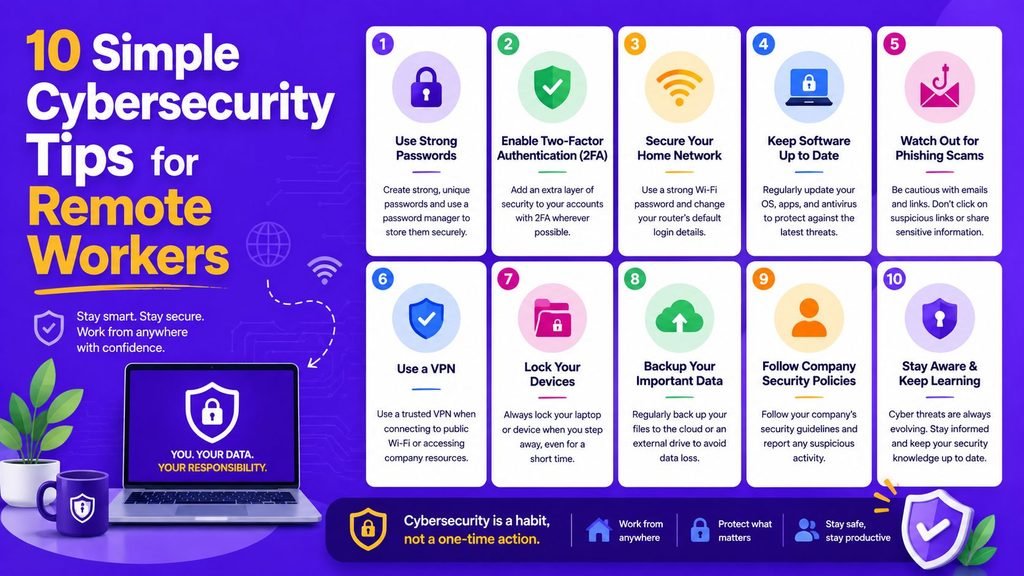
Remote work offers freelancers and distributed teams the freedom to operate from home offices, coworking hubs, or virtually anywhere with an internet connection. However, managing your own workspace also means you are directly responsible for securing your laptops, accounts, cloud files, and client data outside a traditional corporate firewall perimeter.
Adopting simple cybersecurity tips ensures your digital assets remain protected against unauthorized access, phishing scams, and ransomware threats.
In 2026, securing your remote workspace does not require complex IT hardware setups. A few consistent baseline habits—such as deploying password vaults, enabling multi-factor authentication, keeping software updated, and hardening home Wi-Fi routers—drastically reduce your exposure to automated cyberattacks.
This comprehensive guide details 10 actionable simple cybersecurity tips, explores core defense protocols for freelancers, compares key remote work security measures, and provides a practical daily checklist.
Why Remote Work Security Matters in 2026
When operating outside a physical office perimeter, your devices communicate directly across public and private Wi-Fi networks to access cloud repositories.
┌─────────────────────────────────────────────────────────────┐
│                 Remote Work Threat Surfaces                 │
├──────────────────┬──────────────────┬───────────────────────┤
│ Endpoint Devices │ Wi-Fi Networks   │ Cloud SaaS Apps       │
│ (Laptops/Phones) │ (Home & Public)  │ (Email / Databases)   │
└──────────────────┴──────────────────┴───────────────────────┘
Without implementing simple cybersecurity tips, remote environments become vulnerable to:
- Credential Harvesting: Stolen passwords used to compromise client email accounts and payment dashboards.
- Man-in-the-Middle Eavesdropping: Unencrypted web traffic intercepted over unsecured public Wi-Fi access points.
- Malware and Ransomware: Outdated operating systems infected by automated background exploits.
Official remote work security frameworks published by the Cybersecurity and Infrastructure Security Agency (CISA) emphasize that freelancers and independent contractors must establish proactive baseline hygiene across all digital endpoints.
10 Simple Cybersecurity Tips for Remote Workers and Freelancers
1. Enforce Unique, Complex Passphrases
Never reuse passwords across client portals, email accounts, or cloud apps. Reusing a single password creates a domino effect where one leaked database exposes all your digital platforms.
Use a dedicated password manager to generate and store randomized passphrases. Learn step-by-step password vault hygiene in our detailed tutorial on How to Create and Manage Strong Passwords.
2. Enable Multi-Factor Authentication (MFA)
Password protection alone is no longer sufficient. Activating Multi-Factor Authentication adds a secondary verification layer (such as an authenticator app code, biometric passkey, or security key) before account access is granted.
┌─────────────────────────────────────────────────────────────┐
│                 Two-Factor Authentication Flow              │
├──────────────────┬──────────────────┬───────────────────────┤
│ Password Entry   │ Authenticator    │ Secure Account        │
│ (First Factor)   │ App Code (2FA)   │ Access Granted        │
└──────────────────┴──────────────────┴───────────────────────┘
Follow our step-by-step setup guide on How to Set Up Two-Factor Authentication.
3. Recognize and Avoid Phishing Tactics
Phishing remains the primary vector for harvesting login credentials. Be skeptical of unexpected email attachments, urgent requests to wire funds, or suspicious login links claiming to be from clients or software vendors.
To learn how deceptive links operate, read our analysis on What Is Phishing.
4. Enable Automatic Software and Firmware Updates
Unpatched software leaves known security holes exposed to automated exploitation scripts. Ensure your operating system, web browsers, video conferencing clients, and antivirus tools update automatically.
Developers inspecting open-source patch management scripts or security automation tools routinely reference verified security repositories on GitHub.
5. Secure Your Home Wi-Fi Network
Your wireless router serves as the main gateway to all your connected home devices. Incorporating simple cybersecurity tips into your Wi-Fi configuration includes:
- Changing the factory default router administration password.
- Updating wireless encryption to WPA3 or WPA2 standards.
- Creating an isolated guest network for smart home devices (IoT).
To review foundational network setup rules, explore our guide on Network Security Basics.
6. Exercise Caution on Public Wi-Fi Networks
Public Wi-Fi networks in coffee shops, hotels, or airports expose data packets to local network interception. When working remotely in public environments, use encrypted Virtual Private Networks (VPNs) or cellular hotspots to shield your network traffic.
Pair local network controls with external perimeter filtering by reviewing our tutorial on How Firewalls Work.
7. Implement the 3-2-1 Data Backup Strategy
Data loss from hardware failures, device theft, or ransomware can stall a freelance business instantly. Adopt a reliable 3-2-1 backup strategy:
- Keep 3 copies of critical client data.
- Store backups across 2 different media formats (e.g., cloud drives and encrypted external drives).
- Keep 1 backup copy isolated offsite or offline.
8. Separate Personal and Professional Workspaces
Maintain distinct boundaries between personal browsing and professional task management:
- Use dedicated browser profiles for work tasks versus personal entertainment.
- Separate cloud storage folders for distinct client deliverables.
- Avoid downloading personal files onto client-managed devices.
To review identity access management frameworks that enforce strict boundary controls, read our guide on What Is Zero Trust.
9. Lock Endpoint Devices When Leaving Workstations
Always lock your laptop screen with a strong PIN or biometric password whenever stepping away, even in home environments. Enable automatic screen timeout locks after 2 to 3 minutes of inactivity.
10. Audit Data Sharing with AI Tools and Online Applications
Before pasting sensitive client source code, financial spreadsheets, or proprietary project notes into online formatting tools or artificial intelligence platforms, verify that the service terms do not store or train public models on your uploaded data.
For clear rules on securing SaaS applications used across remote teams, read our guide on Easy SaaS Security Rules.
Comparison Table: Core Remote Work Security Controls
| Security Practice | Primary Function | Target Threat Vector | Implementation Effort |
| Password Manager | Stores unique passphrases | Credential stuffing & weak passwords | Low |
| Multi-Factor Auth (MFA) | Requires secondary verification | Stolen logins & password leaks | Low |
| Automated OS Updates | Patches software vulnerabilities | Automated malware exploits | Low |
| Encrypted Backups | Preserves client records | Ransomware & hardware failure | Moderate |
| Wi-Fi WPA3 Hardening | Encrypts local wireless traffic | Local packet sniffing & MitM | Moderate |
Integrating Security Habits Across SaaS Applications
Applying simple cybersecurity tips extends to how you select, evaluate, and configure third-party software for your freelance operations.
┌─────────────────────────────────────────────────────────────┐
│                 Remote Tool Vetting Checklist               │
├─────────────────────────────────────────────────────────────┤
│ 1. Confirm application supports encrypted 2FA / SSO logins │
│ 2. Audit background API access tokens and integrations       │
│ 3. Review SaaS subscription tiers for backup accessibility  │
└─────────────────────────────────────────────────────────────┘
For guidelines on setting up secure background API connections across remote applications, consult our guide on How Software Integration Works.
To evaluate software options before adopting new productivity tools, consult our selection framework on How to Choose Software.
To review pricing structures across software platforms before subscribing, check our Simple SaaS Pricing Guide.
To explore curated security software suites for distributed teams, read our article on the Top SaaS Tools 2026.
Final Thoughts
Mastering simple cybersecurity tips is one of the most effective steps freelancers and remote employees can take to protect their livelihoods. By using unique passwords, turning on Multi-Factor Authentication, hardening home Wi-Fi routers, maintaining routine data backups, and inspecting incoming emails for phishing red flags, you build a resilient digital workspace in 2026.
Start today: install a password manager, enable 2FA across your primary email and cloud storage portals, and secure your home Wi-Fi network.
Frequently Asked Questions (FAQs)
What are the most important simple cybersecurity tips for freelancers?
The most important cybersecurity tips for freelancers are using a password manager to generate unique passwords, enabling Multi-Factor Authentication (MFA) across all accounts, and maintaining 3-2-1 data backups for client files.
Is public Wi-Fi safe for remote workers?
Public Wi-Fi networks in cafés or airports are often unencrypted and susceptible to packet sniffing. Remote workers should use cellular hotspots or an encrypted VPN when connecting from public locations.
Why is Multi-Factor Authentication (MFA) necessary if I already use a strong password?
Even strong passwords can be intercepted through phishing scams or third-party database breaches. MFA ensures that an attacker cannot access your account without holding your secondary physical verification device.
Share Your Experience
What is your top cybersecurity habit as a remote worker or freelancer? Do you rely on hardware security keys, password vaults, or automated cloud backups? Share your tips and questions in the comments below!