How to Create and Manage Strong Passwords in 2026

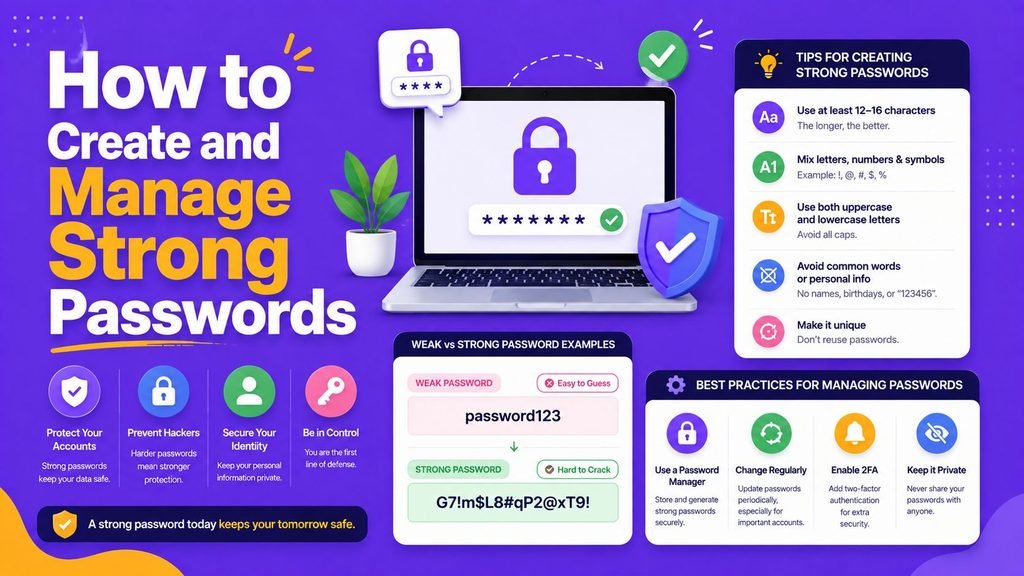
Every single day, we log into dozens of digital services—from work emails and personal bank accounts to online shopping stores and cloud storage. Passwords remain our primary wall of defense against unauthorized access.
Unfortunately, cybercriminals no longer sit around manually guessing your password. They use automated software capable of testing millions of stolen password combinations per second. If you rely on predictable patterns, short codes, or reuse the same password across multiple platforms, a single data breach at an obscure shopping site can put your entire digital life at risk.
The good news is that securing your online identity does not require a degree in cybersecurity. Understanding how to create and manage strong passwords comes down to building a few smart habits and leveraging modern, encrypted tools.
This practical guide breaks down how to create and manage strong passwords, why traditional password rules are outdated, and how to protect your accounts effectively in 2026.
What Makes a Password Truly Strong?
For years, security advice told us to take a short word and add numbers or special characters—turning something like Password into P@ssw0rd123!. However, modern automated attack tools easily crack these predictable substitution patterns.
Current global security standards (such as CISA and NIST SP 800-63B) emphasize length over artificial complexity.
When learning how to create and manage strong passwords, ensure your credentials follow these three core principles:
- Long (At least 16 characters): Every extra character exponentially increases the time and computational power required to crack your password.
- Random: Free from personal details like your birthday, pet’s name, phone number, or street address.
- Unique: Never used on more than one account.
Use Passphrases Instead of Complex Passwords
If remembering a random string of 16 mixed characters like k8#dfH8@Pf!v0gB2 sounds frustrating, passphrases offer a far better alternative.
A passphrase is created by stringing together four or five completely random, unrelated words (for example: coffee purple helmet river jump).
Why Passphrases Work Better:
- Higher Entropy: A long string of random words creates an immense barrier against brute-force automated software.
- Easier to Remember: Human brains naturally remember simple word combinations much better than random symbols.
- No Predictable Rules: Avoid using famous quotes, song lyrics, or common book phrases, as automated tools readily recognize them.
The Danger of Reusing Passwords
Password reuse is one of the most widespread security vulnerabilities on the internet.
When a website suffers a security breach, attackers harvest stolen email-and-password lists and deploy automated bots to test those exact combinations across popular banking, social media, and email platforms. This attack technique is known as credential stuffing.
Using a unique credential for every single online service ensures that if one company experiences a breach, your other accounts remain completely isolated and secure.
Use a Dedicated Password Manager
Attempting to memorize 50 or 100 unique, 16-character passphrases is completely unrealistic. This is why discovering how to create and manage strong passwords leads directly to adopting a password manager.
A password manager is an encrypted digital vault that generates, stores, and automatically fills your login credentials across all your devices.
Essential Benefits of Password Managers:
- Zero-Knowledge Encryption: Your vault is encrypted so that only you hold the master key.
- Automatic Generation: Instantly creates complex, 20+ character passwords for new registrations.
- Phishing Defense: Password managers recognize exact domain names and will not auto-fill your credentials on fake phishing websites.
- Security Audits: Automatically alerts you if any of your saved logins appear in a public data breach.
Popular end-to-end encrypted password managers include Bitwarden, 1Password, and KeePass.
Enable Multi-Factor Authentication (MFA)
Even the strongest passphrase benefits from an added layer of defense. Multi-factor authentication (MFA) requires you to provide a second form of verification before granting account access.
Common MFA methods include:
- Authenticator Apps (Recommended): Tools like Google Authenticator or Microsoft Authenticator generate time-sensitive codes directly on your phone.
- Hardware Security Keys (Strongest): Physical USB keys (like YubiKeys) that require a physical tap to authenticate.
- SMS Verification (Least Secure): Text message codes are helpful, but remain vulnerable to SIM-swapping attacks.
Enabling app-based MFA or hardware security keys ensures your account remains protected even if an attacker manages to obtain your password.
To see how modern web technologies integrate secure authentication frameworks, read our guide on Latest Software and AI Tech Trends.
Watch Out for Phishing Attacks
A strong password cannot protect your account if you willingly type it into a fraudulent website. Phishing emails, deceptive text messages, and cloned login portals are explicitly designed to steal user credentials.
Protect your accounts by following these habits:
- Always verify the exact website URL in your browser address bar before typing login details.
- Never click on urgent account-verification links sent via unexpected emails or text messages.
- Rely on your password manager—if the auto-fill prompt does not appear, double-check that you are on the official website.
Common Password Mistakes to Eliminate
When reviewing how to create and manage strong passwords, ensure you avoid these common security missteps:
- Forced Periodic Resets: Changing your password every 90 days without a reason leads to predictable patterns (e.g.,
Spring2026!becomingSummer2026!). Change passwords only when a breach occurs or compromise is suspected. - Storing Logins in Plain Text: Never write passwords in unencrypted notes apps, spreadsheet files, or physical sticky notes attached to your monitor.
- Sharing Credentials over Chat: Avoid sending passwords through unencrypted messaging apps or standard email threads.
Emerging Password Trends in 2026: The Rise of Passkeys
While understanding how to create and manage strong passwords remains vital, authentication technology is continuously evolving toward passwordless sign-ins.
Major platforms now support Passkeys (built on WebAuthn and FIDO2 standards). Passkeys allow you to log into websites using your device’s biometric sensors—such as fingerprint readers or facial recognition—or a hardware security key.
Passkeys are inherently phishing-resistant because they rely on cryptographic key pairs rather than shared secrets, representing the next major step in online account security. You can track open-source implementations and security standards on developer platforms like GitHub.
Summary Checklist for Secure Authentication
| Practice | Recommended Standard | Status |
| Password Length | Minimum 16 characters or 4+ word passphrases | ✅ |
| Uniqueness | Dedicated, non-reused password for every service | ✅ |
| Storage | Stored inside an encrypted password manager vault | ✅ |
| Second Factor | App-based MFA or physical hardware key enabled | ✅ |
| Phishing Defense | URL verification before submitting credentials | ✅ |
| Breach Monitoring | Immediate password updates following reported breaches | ✅ |
Final Thoughts
Mastering how to create and manage strong passwords is one of the most effective steps you can take to safeguard your digital footprint. By moving away from short, complex passwords in favor of long passphrases, utilizing a trusted password manager, and activating multi-factor authentication, you build a resilient defense against cyber threats.
Start by securing your primary email and financial accounts today, and gradually transition your entire digital footprint to unique, manager-stored passwords!
Frequently Asked Questions (FAQs)
Are browser-built-in password managers safe enough to use?
Browser-based password managers built into Chrome, Safari, or Firefox offer basic protection that is far better than reusing passwords. However, dedicated password managers provide superior cross-platform syncing, stronger zero-knowledge encryption, and advanced security auditing features.
Should I change my passwords every few months?
No. Modern security guidelines from NIST and CISA advise against routine password changes unless there is evidence of a security breach. Forcing frequent changes often causes people to create weaker, predictable variations of old passwords.
What should I do if one of my passwords is exposed in a data breach?
Log into the affected service immediately, update your password to a new 16+ character unique passphrase, and ensure multi-factor authentication is active. If you reused that password on any other platform, change it there immediately as well.
Share Your Thoughts
How do you currently handle your account security? Have you adopted a password manager or transitioned to passphrases yet? Share your thoughts, tips, or questions in the comments below!

10 Comments