Customer Support Software List: 9 Proven Best Tools in 2026

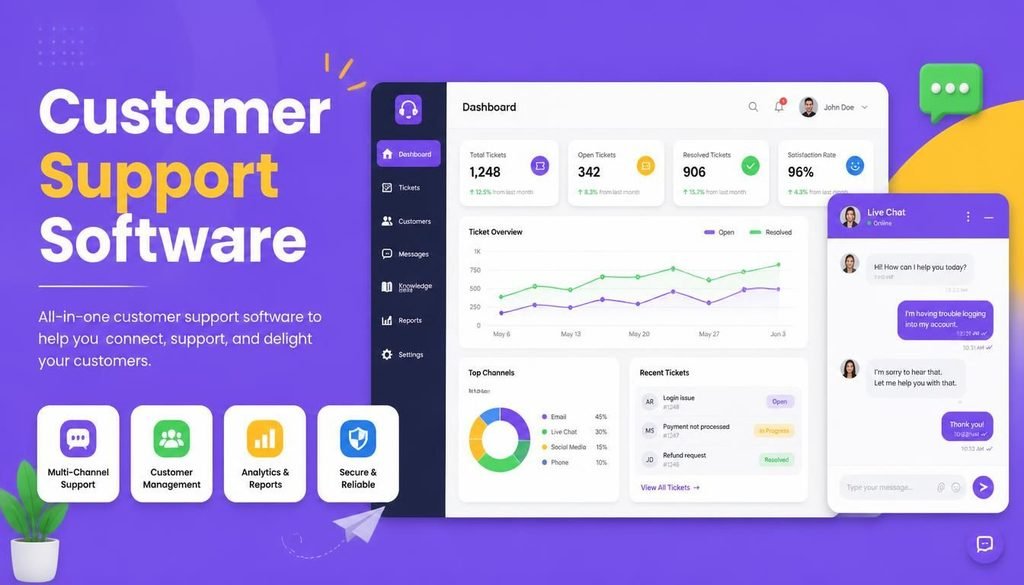
Delivering exceptional customer service becomes increasingly complex as your business grows. When customer inquiries arrive simultaneously across email, live chat, social media channels, and web forms, managing incoming requests from a basic shared inbox inevitably leads to missed messages, slow response times, and frustrated buyers.
This is where referencing a comprehensive customer support software list becomes essential for modern businesses.
Dedicated customer service platforms consolidate fragmented communication channels into a single organized workspace. They empower support teams to track tickets, build self-service knowledge bases, automate routine follow-ups, and leverage artificial intelligence to resolve repetitive customer queries instantly.
In this practical guide, we present a curated customer support software list for 2026, comparing top help desk solutions, their core strengths, key features, and ideal use cases to help you select the right platform for your team.
What Is Customer Support Software and Why Does It Matter in 2026?
Customer support software refers to cloud-hosted tools designed to help organizations collect, manage, prioritize, and resolve customer service inquiries efficiently.
Key capabilities provided by platforms on our customer support software list include:
- Centralized Shared Inboxes: Unify emails, chats, and social messages into a single, collaborative team dashboard.
- Help Desk Ticketing: Assign unique tracking numbers and status tags to every incoming customer issue.
- Automated Ticket Routing: Automatically assign requests to specific support agents based on query type or language.
- Self-Service Portals: Empower customers to find answers independently using public documentation and FAQs.
In 2026, customer expectations for instant responses are higher than ever. Utilizing modern support software allows startups, ecommerce stores, and enterprises to maintain high satisfaction scores while keeping operational overhead low.
The Ultimate Customer Support Software List for 2026
Selecting the right tool from a customer support software list requires matching platform capabilities with your primary support channels and team size. Below are the top nine solutions leading the industry this year.
1. Freshdesk — Best for Value-Focused Small and Growing Teams
Freshdesk is a versatile help desk platform designed to deliver essential ticketing, automation, and omnichannel support without overwhelming smaller teams with unnecessary complexity.
Key Strengths:
- Intuitive ticket conversion from email, chat, and phone calls
- Built-in SLA (Service Level Agreement) management to ensure timely responses
- Integrated knowledge base editor for self-service documentation
- Freddy AI assistant for suggested replies and ticket classification
Best For: Small-to-medium businesses seeking a balanced, budget-friendly help desk.
2. Zendesk — Best for Enterprise and High-Volume Operations
Zendesk is a global market leader offering enterprise-grade ticketing, complex workflow customization, advanced reporting, and deeply embedded AI capabilities.
Key Strengths:
- Powerful omnichannel inbox routing across web, mobile, and social messaging apps
- Granular analytics dashboards tracking agent performance and resolution speeds
- Massive integration ecosystem connecting with thousands of third-party tools
- AI agents capable of handling end-to-end customer conversations autonomously
Best For: Medium-to-large organizations with high ticket volumes and complex routing needs.
3. Help Scout — Best for Clean, Email-First Customer Care
Help Scout focuses on providing a human, personalized support experience. Unlike traditional ticketing tools that display rigid ticket numbers to customers, Help Scout feels like a standard email interaction.
┌─────────────────────────────────────────────────────────────┐
│                 Help Scout Shared Inbox                     │
├──────────────────┬──────────────────┬───────────────────────┤
│ Incoming Email   │ Team Collaboration│ Personal Email Reply │
│ (Customer Query) │ (Internal Notes) │ (No Ticket Numbers)   │
└──────────────────┴──────────────────┴───────────────────────┘
Key Strengths:
- Clean shared inbox interface with collision detection to prevent duplicate replies
- “Beacon” widget combining live chat and self-service docs on your website
- Native customer profile sidebars displaying contextual interaction histories
Best For: Agencies, boutique brands, and small teams prioritizing personalized email support.
4. Intercom — Best for AI-Driven Conversational Support
Intercom leads the industry in proactive messaging and AI-first customer engagement. Its proprietary AI agent, Fin, handles a substantial portion of support volume automatically using your existing help center documentation.
Key Strengths:
- Conversational messenger widget built for web and mobile applications
- Advanced AI chatbot capability for immediate query resolution
- Proactive outbound messaging to guide users through onboarding steps
Best For: SaaS companies, tech startups, and digital platforms focusing heavily on live chat.
5. HubSpot Service Hub — Best for Seamless CRM Integration
HubSpot Service Hub connects customer support directly to the core HubSpot CRM database, giving agents complete visibility into a customer’s purchasing history, marketing interactions, and sales records.
Key Strengths:
- Native integration with sales and marketing CRM records
- Customer feedback survey tools (NPS, CSAT, CES) built directly into the platform
- Automated ticket pipelines triggered by customer deal stages or form submissions
Best For: Businesses already using HubSpot CRM that want unified sales and service data.
To learn more about complementary business tools that accelerate operational growth, read our comprehensive guide on the Top SaaS Tools 2026.
6. Gorgias — Best for Shopify and Ecommerce Stores
Gorgias is built specifically for online retailers. It integrates directly with major ecommerce platforms like Shopify, Magento, and BigCommerce, allowing support agents to view, edit, and refund orders inside the support ticket.
Key Strengths:
- Real-time order data display (order status, tracking numbers, cart value)
- One-click macros for duplicate shipping inquiries and order cancellations
- Revenue tracking metrics attributing sales directly to support chat interactions
Best For: Ecommerce merchants and online DTC (Direct-to-Consumer) brands.
7. Zoho Desk — Best for Companies Operating in the Zoho Ecosystem
Zoho Desk is the help desk arm of the comprehensive Zoho business suite. It provides ticket management, workflow automation, and AI assistance at an affordable price point.
Key Strengths:
- Seamless data synchronization across the entire Zoho software ecosystem
- Zia AI assistant for sentiment analysis and auto-tagging incoming tickets
- Multi-department management from a unified administrator dashboard
Best For: Budget-conscious small businesses already utilizing Zoho software.
8. Jira Service Management — Best for IT and Internal Team Support
Not all support tickets originate from external customers. Jira Service Management is designed specifically for IT service management (ITSM) and internal employee help desks.
Key Strengths:
- Purpose-built incident, problem, change, and asset management workflows
- Native integration with Jira Software for direct developer escalation
- Customizable self-service portals for internal hardware and software requests
Best For: IT departments, software development companies, and technical support teams.
9. Crisp — Best for Lightweight Startup Live Chat
Crisp offers a lightweight, modern messaging workspace for startups seeking live chat, shared inboxes, and basic chatbot automation without enterprise complexity.
Key Strengths:
- Fast live chat widget with real-time visitor co-browsing features
- Multi-channel inbox supporting email, Messenger, WhatsApp, and Telegram
- Affordable flat-rate pricing tiers for small teams
Best For: Early-stage startups and lean teams needing lightweight live chat.
Comparison Table: Top Tools from Our Customer Support Software List
| Software Platform | Primary Focus | Standout Feature | Free Tier / Trial Available? |
| Freshdesk | Value help desk | Excellent ticketing & SLA tracking | ✅ Free Plan Available |
| Zendesk | Enterprise operations | Omnichannel routing & deep analytics | ✅ 14-Day Free Trial |
| Help Scout | Email-first support | Human shared inbox without ticket numbers | ✅ 15-Day Free Trial |
| Intercom | Messaging & AI | Fin AI agent for automated resolutions | ✅ 14-Day Free Trial |
| HubSpot Service Hub | CRM alignment | Native CRM data & CSAT surveys | ✅ Free Plan Available |
| Gorgias | Ecommerce support | Direct Shopify order edits inside tickets | ✅ 7-Day Free Trial |
| Zoho Desk | Ecosystem integration | Seamless Zoho CRM & app sync | ✅ Free Plan Available |
| Jira Service Mgmt | IT & internal support | Technical ITSM & issue tracking | ✅ Free Plan Available |
| Crisp | Lightweight chat | Live co-browsing & simple messenger | ✅ Free Plan Available |
|
How to Choose from This Customer Support Software List
Selecting the right platform from any customer support software list requires reviewing your operational requirements before committing to a paid subscription.
1. Identify Your Primary Communication Channels
Determine where your customers prefer to reach you. If 80% of your inquiries arrive via email, prioritize email-first tools like Help Scout or Freshdesk. If you operate a high-volume SaaS platform, prioritize chat-first tools like Intercom.
2. Verify Security and Access Controls
Customer support interactions frequently involve sensitive user details, order histories, and payment receipts. Ensure your selected help desk enforces strong security controls:
- Enforce Multi-Factor Authentication (MFA) for all support agents.
- Apply strict Role-Based Access Control (RBAC) to restrict sensitive customer data viewing.
- Ensure password management compliance across all user dashboards. Learn more in our dedicated guide on How to Create and Manage Strong Passwords.
3. Evaluate AI Capabilities and Total Cost
While AI features can resolve routine questions automatically, evaluate the pricing structure carefully. Some software providers charge flat monthly fees, while others bill per AI-resolved conversation.
To review how to evaluate software pricing structures and total cost of ownership, check our guide on How to Choose Software.
Practical Checklist: Help Desk Evaluation
- [ ] Channel Coverage: Does this software connect with our email, chat, and social channels?
- [ ] Self-Service: Can we easily publish a knowledge base or FAQ documentation portal?
- [ ] Automation Rules: Can we set up automatic ticket assignment based on agent availability?
- [ ] CRM Integration: Does the platform display contextual customer purchase history?
- [ ] Reporting: Does it track first-response times, resolution rates, and customer satisfaction?
Final Thoughts
Referencing a structured customer support software list helps eliminate guesswork when upgrading your customer service infrastructure. The ideal platform is the one that removes friction for your agents, fits comfortably within your monthly budget, and delivers fast, accurate answers to your buyers.
Start by evaluating your current ticket volume, test two or three platforms using free trials, and deploy a system that positions your customer service team for long-term success.
Frequently Asked Questions (FAQs)
What is the best tool on this customer support software list for small businesses?
Freshdesk and Help Scout are widely considered the best options for small businesses due to their affordable pricing tiers, intuitive interfaces, and low setup times.
Can a small business manage customer support without dedicated software?
Handling customer queries via standard email inboxes works temporarily for very low volumes. However, as inquiry volume increases, using dedicated support software prevents lost emails, eliminates duplicate agent replies, and drastically improves response speeds.
How do AI features improve customer support platforms in 2026?
Modern AI tools automatically summarize lengthy email chains for agents, suggest draft responses based on past resolution data, classify ticket urgency, and resolve routine FAQ inquiries through automated AI chatbots.
Share Your Experience
Which platform from this customer support software list powers your business operations? Do you prefer the human inbox approach of Help Scout, the visual ticketing of Freshdesk, or the conversational AI of Intercom? Share your thoughts and recommendations in the comments below!