How to Prevent Ransomware Attacks: 10 Best Proven Tips to Protect Your Data

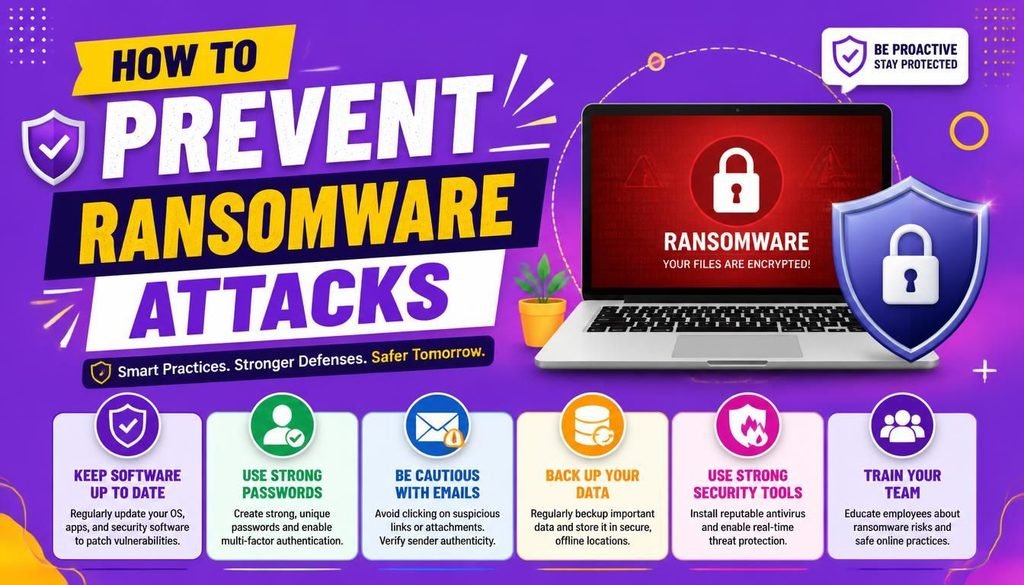
Imagine turning on your computer on a busy Monday morning, only to find every single file, family photo, and business document locked behind an unreadable code. A dark screen pops up demanding hundreds or thousands of dollars in cryptocurrency within 48 hours—or your data disappears forever.
This is the nightmare reality of ransomware. It is one of the most destructive forms of cybercrime affecting everyday internet users, remote workers, small businesses, and global enterprises alike.
While ransomware news can sound intimidating, staying safe does not require an advanced computer science degree. Learning how to prevent ransomware attacks starts with understanding that most infections exploit basic security oversights—like skipped system updates, recycled passwords, or accidental clicks on suspicious links.
Understanding how to prevent ransomware attacks comes down to building a few resilient digital defense habits.
Let’s dive into how to prevent ransomware attacks, explore how these malicious programs operate, and break down 10 actionable security measures to keep your digital life completely secure in 2026.
What Is Ransomware and How Does It Spread?
Ransomware is a specialized category of malware that encrypts your files or locks your operating system, preventing you from accessing your own data. Criminals then demand a ransom payment in exchange for a decryption key.
Modern cybercriminals also practice “double extortion”—stealing sensitive personal or business files before encrypting them, threatening to leak private records online if the ransom goes unpaid.
If you are researching how to prevent ransomware attacks, understanding their entry points is essential:
- Phishing Emails: Deceptive messages containing infected attachments or malicious link triggers.
- Unpatched Software Vulnerabilities: Exploiting security holes in outdated operating systems or web browsers.
- Compromised Logins: Using credential-stuffing bots to guess weak passwords on remote desktop portals or cloud services.
- Malicious Downloads: Disguising infected software inside pirated programs, unofficial app stores, or fake popup ads.
Key global security bodies like the Cybersecurity and Infrastructure Security Agency (CISA) continuously emphasize that multi-layered defense is the absolute gold standard when discovering how to prevent ransomware attacks before they destroy critical systems.
1. Keep Your Operating System and Software Updated
Skipping software update notifications is one of the easiest ways to invite malware into your system.
Cybercriminals routinely scan the internet for unpatched security flaws. Operating system updates (for Windows, macOS, Linux, iOS, and Android) contain crucial security patches that close these digital doors. When asking how to prevent ransomware attacks, enabling automatic software updates across all your personal and work devices is your very first line of defense.
2. Follow the 3-2-1 Backup Strategy
If you want to know the ultimate secret of how to prevent ransomware attacks from destroying your business or personal life, it comes down to reliable backups.
If you possess a clean, isolated copy of your data, a ransomware attack loses its power. Follow the industry-standard 3-2-1 backup rule:
- Keep 3 copies of your important files.
- Store them on 2 different types of media (e.g., an internal hard drive and a cloud storage service).
- Keep 1 copy completely offline and disconnected from your network.
Crucial Tip: Disconnect physical external hard drives when they are not actively backing up files. If a ransomware infection strikes while your backup drive is plugged in, the malware can encrypt the backup drive too!
3. Utilize Unique Passphrases and Password Managers
Reusing the same password across multiple websites creates a massive security vulnerability. If a minor shopping site suffers a breach, attackers can easily use those stolen credentials to break into your primary email, cloud storage, or remote work accounts.
Mastering how to prevent ransomware attacks requires using a unique, 16+ character passphrase for every single account. Utilizing an encrypted password manager allows you to generate and store complex passwords without having to memorize dozens of random strings.
4. Enforce Phishing-Resistant Multi-Factor Authentication (MFA)
Multi-Factor Authentication (MFA) adds a crucial secondary barrier to your login portals. Even if an attacker uncovers your password, they cannot gain access without your second verification factor.
For maximum protection against advanced social engineering, use authenticator apps or physical hardware security keys (such as YubiKeys) rather than basic SMS text verification codes.
5. Develop High Phishing Awareness
Phishing emails have evolved far beyond poorly written scam messages. Today, attackers leverage sophisticated AI text generators to craft convincing emails impersonating banks, shipping services, or trusted colleagues.
When analyzing how to prevent ransomware attacks through inbox safety:
- Never open unexpected email attachments (especially files ending in
.exe,.scr,.zip, or.vbs). - Verify suspicious requests from coworkers or supervisors through a separate communication channel (like a phone call).
- Inspect the sender’s actual email address, not just their display name.
6. Download Software Exclusively from Official Sources
Avoid downloading software, games, or browser extensions from third-party file-sharing sites, torrent hubs, or unofficial download portals. Pirated software and cracked applications frequently serve as hidden delivery vehicles for ransomware payloads.
Stick strictly to official developer websites, verified app stores, and official software repositories.
7. Secure Your Home Network and Router
As remote work becomes standard, home Wi-Fi networks have become prime targets for cyberattacks. Protecting your central internet router strengthens your overall security footprint.
Take these quick network steps:
- Change your router’s default administrator login credentials immediately.
- Update your router’s firmware regularly.
- Ensure your network uses modern WPA3 or WPA2 AES wireless encryption.
- Create an isolated guest Wi-Fi network for smart home IoT devices and visiting guests.
8. Practice the Principle of Least Privilege
You don’t need to run your computer as an Administrator for basic daily tasks like browsing the web or drafting documents.
Set up a standard user account for your daily activities and reserve the master Administrator account only for installing software or changing core system settings. This basic boundary stops malicious scripts from making system-wide changes if you accidentally click a malicious link.
9. Secure Cloud Accounts and Shared Drives
Cloud storage services (like Google Drive, OneDrive, and Dropbox) make collaboration easy, but automatic file synchronization can carry risks. If a ransomware virus encrypts files on your local desktop, those encrypted files might instantly sync to your cloud folder.
Ensure your cloud provider offers version history recovery, allowing you to restore unencrypted versions of your documents if a security incident occurs.
10. Train Everyone in Your Organization or Household
Cybersecurity is a team effort. A single untrained employee or family member who opens an infected attachment can compromise an entire connected network.
Regularly review basic security practices with your family or staff members. Encourage an open environment where employees feel safe reporting suspicious emails or accidental clicks immediately, as early detection dramatically limits the scope of a breach.
Developers and security engineers frequently publish open-source security audit tools, ransomware detection scripts, and mitigation playbooks on developer hubs like GitHub, making enterprise-grade security knowledge available to everyone learning how to prevent ransomware attacks.
To see how advanced software security fits into broader technology trends, explore our comprehensive guide on Latest Software and AI Tech Trends.
Side-by-Side Overview: Weak Habits vs. Preventive Habits
| Security Category | Weak Security Practice | Proven Preventive Practice |
| Backups | No backups or leaving backup drive plugged in | Isolated, offline 3-2-1 backup strategy |
| Passwords | Reusing one password across 10 websites | Unique passphrases stored in a password manager |
| Authentication | Single password protection only | Multi-Factor Authentication (MFA) enabled |
| Software Management | Ignoring OS update notifications | Automatic security updates turned on |
| Software Sources | Unofficial downloads and pirated software | Official app stores and vendor websites |
What to Do If You Suspect a Ransomware Infection
If you suddenly notice unexpected file extensions, high CPU usage, or ransom text files appearing on your desktop, act immediately:
- Disconnect from the Network: Unplug your Ethernet cable and disable Wi-Fi instantly to prevent the malware from spreading to other computers on your network.
- Isolate the Device: Power down affected smart home or network storage devices connected to the same Wi-Fi.
- Do Not Pay the Ransom: Law enforcement agencies strongly advise against paying ransoms. Payment encourages criminal activity and offers zero guarantee that you will receive a working decryption key.
- Restore from Offline Backups: Wipe the infected machine completely, reinstall your operating system, and restore your files from your clean offline backup.
Final Thoughts
Learning how to prevent ransomware attacks is not about living in constant fear of the internet. It is about taking sensible, proactive control of your digital environment.
By keeping your operating systems updated, maintaining isolated 3-2-1 backups, using strong passphrases with MFA, and staying alert against phishing emails, you create a formidable defense that cybercriminals will simply pass over in search of easier targets.
Now that you know how to prevent ransomware attacks, share this guide with your friends or team to help keep everyone safe online!
Frequently Asked Questions (FAQs)
Does standard antivirus software stop all ransomware attacks?
Modern antivirus and endpoint protection tools catch the vast majority of known ransomware threats. However, because cybercriminals constantly create new “zero-day” malware strains, antivirus software must always be paired with offline backups and careful browsing habits.
Can mobile phones get infected with ransomware?
Yes, smartphones running Android or iOS can be targeted by ransomware—typically through malicious apps downloaded outside official app stores or phishing links. Keep your mobile operating system updated and avoid third-party app installations.
What is the difference between cloud syncing and a true backup?
Cloud syncing mirrors files instantly; if a file gets corrupted or encrypted locally, the corrupted version overwrites the cloud version. A true backup maintains historical, isolated snapshots of your data that cannot be altered by automated local changes.
Share Your Thoughts
Which of these tips on how to prevent ransomware attacks do you plan to implement first? Do you use an offline drive, cloud services, or a combination of both? Share your favorite security habits or ask any questions in the comments below!