Best Laptop Specs for Computer Science Students in 2026

If you are starting a computer science program in 2026, your laptop should still feel fast and reliable after several semesters of heavy software development, virtual machines, AI projects, and everything else your degree will demand. Finding the best laptop specs for computer science students can save you time, reduce stress, and help you finish assignments without dealing with lag, crashes, or constant upgrades.
In this guide, we’ll walk through the best laptop specs for computer science students in 2026, explain why each part matters, and help you decide where your money is best spent.
Best Laptop Specifications at a Glance
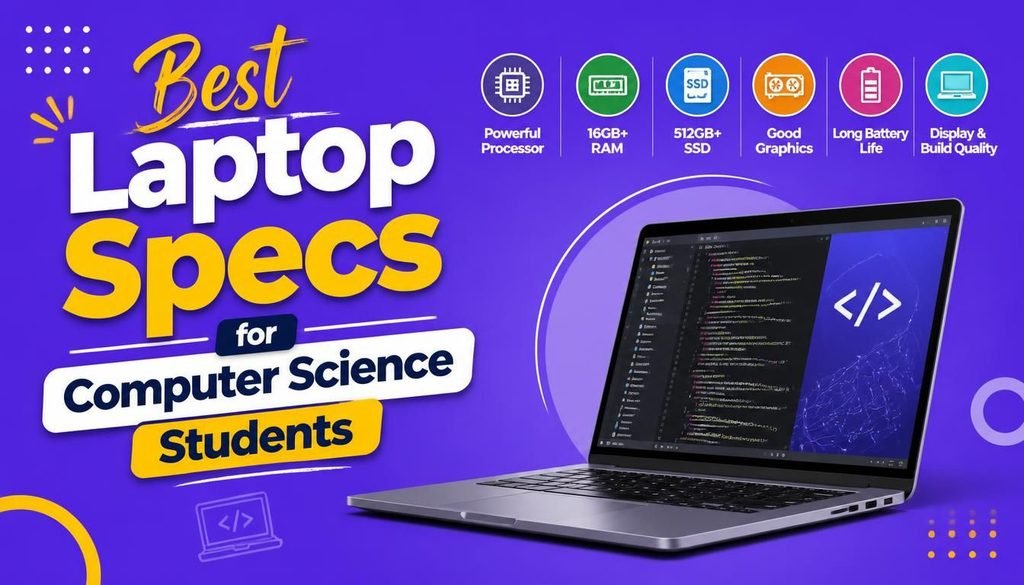
If you want the short version, here is the ideal laptop setup when evaluating the best laptop specs for computer science students.
| Component | Recommended Specification |
|---|---|
| Processor | Intel Core Ultra 7, AMD Ryzen 7 AI, or Apple M4 |
| RAM | 16GB minimum, 32GB recommended |
| Storage | 1TB NVMe SSD (512GB minimum) |
| Graphics | Integrated graphics or NVIDIA RTX 4060+ for AI/Game Development |
| Display | 14–16-inch Full HD or 2.5K IPS |
| Battery | 10+ hours |
| Operating System | Windows 11, macOS, or Linux |
| Connectivity | Wi-Fi 7, Bluetooth 5.4 |
| Weight | Under 1.8 kg |
These specs are strong enough for almost every programming course and should stay useful for four to five years.
Why Laptop Specifications Matter for Computer Science Students
Unlike many other majors, computer science students depend on their laptops every day.
You will probably use your laptop for:
- Writing code
- Building websites
- Developing mobile apps
- Running virtual machines
- Using Docker containers
- Managing databases
- Working on cloud computing labs
- Training machine learning models
- Practicing cybersecurity
- Testing software
As your coursework gets more advanced, the tools you use become more demanding too. That is why choosing hardware that meets the best laptop specs for computer science students early can save you money and frustration later.
Processor (CPU): The Most Important Component
The processor is the core of your laptop. It affects how fast your system compiles code, launches apps, and handles multiple tasks at once.
Best CPUs for Computer Science in 2026
The strongest options when matching the best laptop specs for computer science students include:
- Intel Core Ultra 7
- Intel Core Ultra 9
- AMD Ryzen 7 AI Series
- AMD Ryzen 9
- Apple M4
- Apple M4 Pro
These chips are powerful enough for everything from beginner programming classes to advanced AI and development workloads.
Is a Core Ultra 5 or Ryzen 5 Enough?
Yes, it can be. If you are working with a tighter budget, a Core Ultra 5 or Ryzen 5 laptop with 16GB of RAM will still handle most computer science tasks very well.
How Much RAM Do You Really Need?
RAM is what lets your laptop keep several programs open at the same time without slowing down.
Think about a normal study session. You might have:
- Visual Studio Code
- Google Chrome with 20 tabs open
- Docker
- Discord
- Microsoft Teams
- A virtual machine
- Spotify
All of those apps use memory.
Recommended RAM
- 16GB RAM (Great for): Programming, web development, Java, Python, C++, databases, and Android Studio.
- 32GB RAM (Better for): Machine learning, artificial intelligence, cybersecurity labs, multiple virtual machines, and large software engineering projects.
Try to avoid laptops with only 8GB of RAM in 2026 unless you know you can upgrade right away.
SSD Storage: Faster Is Always Better
Storage affects how quickly your laptop starts up, opens apps, and loads projects.
- Minimum Storage: 512GB NVMe SSD
- Recommended Storage: 1TB NVMe SSD
A 1TB SSD gives you enough space for programming projects, IDEs, Docker images, Linux installations, virtual machines, AI datasets, and media files. Traditional hard drives are no longer a smart choice for computer science students because they are much slower than SSDs.
Do You Need a Dedicated Graphics Card?
For most students, the answer is no. Programming depends far more on CPU power and RAM than on graphics performance.
Integrated graphics are more than enough for:
- Python programming
- Web development
- Java development
- SQL databases
- Linux
- Cloud computing
When a Dedicated GPU Makes Sense
A dedicated NVIDIA RTX GPU is worth considering if you plan to focus on:
- Artificial Intelligence
- Deep Learning
- Computer Vision
- Game Development
- 3D Graphics
- Video Rendering
For these tasks, an RTX 4060 or newer can give you a clear performance boost.
Display: Choose Comfort Over Size
You will spend thousands of hours looking at your laptop screen, so display quality matters. A good screen helps reduce eye strain and makes coding more comfortable.
Best Display Size
- 14-inch: Lightweight, easy to carry, and better battery life.
- 15-inch or 16-inch: More room for code, better multitasking, and easier split-screen use.
Resolution
Look for Full HD (1920×1080) minimum, or 2.5K or higher if your budget allows. An IPS panel is also a smart choice because it gives you better colors and wider viewing angles.
Battery Life Can Make or Break Your Day
Computer science students often work in lecture halls, libraries, and coffee shops where charging is not always easy.
Try to get at least 10 hours of real-world battery life. Good battery life means you can attend classes, work on projects, and study without constantly hunting for a power outlet.
Which Operating System Should You Choose?
Every operating system has its own strengths.
- Windows: Best for general programming, software engineering, gaming, and engineering software.
- mac OS: Best for iOS development, web development, UNIX-based programming, and long battery life. You can review hardware specifications directly on the Official Apple Mac Page.
- Linux: Best for cybersecurity, cloud computing, server administration, and open-source development.
Many students use Linux alongside Windows or run it in a virtual machine so they can learn both environments.
Connectivity and Ports
Modern laptops are getting thinner, but you should still pay attention to ports and wireless features when aiming for the best laptop specs for computer science students.
- Useful ports include: USB-C, USB-A, HDMI, Headphone jack, and Thunderbolt 4 or USB4.
- Wireless features should include: Wi-Fi 7 and Bluetooth 5.4.
These make it easier to connect external monitors, storage drives, and networking gear.
Recommended Laptop Specs Based on Your Specialization
Software Development
- Core Ultra 7 or Ryzen 7
- 16GB RAM
- 1TB SSD
Artificial Intelligence
- Core Ultra 9 or Ryzen 9
- 32GB RAM
- NVIDIA RTX GPU
- 1TB SSD
Cybersecurity
- Core Ultra 7
- 32GB RAM
- 1TB SSD
- Linux support
Web Development
- Ryzen 5 or Core Ultra 5
- 16GB RAM
- 512GB–1TB SSD
Mobile App Development
- Android: Windows or Linux, 16GB RAM
- iOS: Apple MacBook with M4 chip, 16GB RAM minimum
To see how modern development workflows are evolving across these platforms, check out our guide on Latest Software and AI Tech Trends.
Tips for Buying a Future-Proof Laptop in 2026
If you want your laptop to last through your degree, focus on buying a machine that meets the best laptop specs for computer science students:
- Get at least 16GB of RAM.
- Choose a 1TB NVMe SSD if your budget allows.
- Pick a modern Intel Core Ultra, AMD Ryzen AI, or Apple M4 processor.
- Look for strong battery life.
- Choose a comfortable keyboard since you will type for hours.
- Buy from a trusted brand with solid warranty support.
Spending a little more now to get the best laptop specs for computer science students can help you avoid replacing your laptop halfway through university.
Final Verdict
As a developer, getting the best laptop specs for computer science students in 2026 is all about balancing performance, portability, and long-term value. High-end laptops can be impressive, but most students do not need the most expensive model available.
For most computer science students, the sweet spot for the best laptop specs for computer science students is a modern Intel Core Ultra 7, AMD Ryzen 7 AI, or Apple M4 processor, 16GB to 32GB of RAM, a 1TB NVMe SSD, a Full HD or higher display, and at least 10 hours of battery life. That combination is strong enough for programming, web development, databases, cloud computing, cybersecurity labs, and even entry-level AI work.
Choosing the right laptop now means less waiting, fewer headaches, and more time spent building your skills and finishing projects with confidence.
Frequently Asked Questions (FAQs)
Is 16GB RAM enough for computer science in 2026?
Yes. For most students, 16GB is the minimum recommended amount and is enough for coding, web development, databases, and general coursework. If you plan to work with AI, cybersecurity, or multiple virtual machines, 32GB is the better option.
Is a dedicated GPU necessary for programming?
No. Integrated graphics are enough for most programming tasks. A dedicated NVIDIA RTX GPU is mainly useful for AI, deep learning, game development, and other graphics-heavy workloads.
Should I choose Windows, macOS, or Linux?
All three are excellent choices. Windows offers broad software compatibility, macOS is great for iOS development and battery life, and Linux is widely used in servers, cloud computing, and cybersecurity.
What is the best storage size for a computer science student?
A 1TB NVMe SSD is the best long-term choice. It gives you enough space for development tools, virtual machines, Docker images, and large programming projects.
Share Your Thoughts
What laptop are you planning to buy for computer science in 2026? Do you have questions about finding the best laptop specs for computer science students? Leave a comment below—we’d love to help. You can also check out our other laptop buying guides, coding tips, and tech reviews to make smarter technology decisions.