How Computer Vision Works: 7 Powerful Secrets to Master Visual AI in 2026

Computers excel at processing spreadsheets and numerical calculations, but interpreting visual scenes is a completely different challenge. Computer vision is the field of artificial intelligence that enables machines to extract meaningful information from digital images and video streams.
From unlocking smartphones via facial recognition to helping autonomous vehicles detect road hazards, learning how computer vision works unlocks the engine driving modern visual automation. Businesses across healthcare, manufacturing, retail, and document processing rely on these visual models to streamline everyday workflows.
What Is Computer Vision?
Computer vision allows software to analyze visual inputs and extract operational data. A digital image is simply a grid of tiny pixels containing numerical color and brightness values. Understanding how computer vision works starts with recognizing how algorithms convert these raw numbers into high-level visual understanding.
┌─────────────────────────────────────────────────────────────┐
│                 Basic Visual Pipeline                       │
├─────────────────────────────────────────────────────────────┤
│ Digital Pixels ──> Pattern Extraction ──> Neural Inference  │
└─────────────────────────────────────────────────────────────┘
When an algorithm evaluates a street photo, it determines object boundaries, identifies vehicle types, estimates physical distances, and tracks movement across consecutive frames.
How Computer Vision Works: The Core 5-Step Pipeline
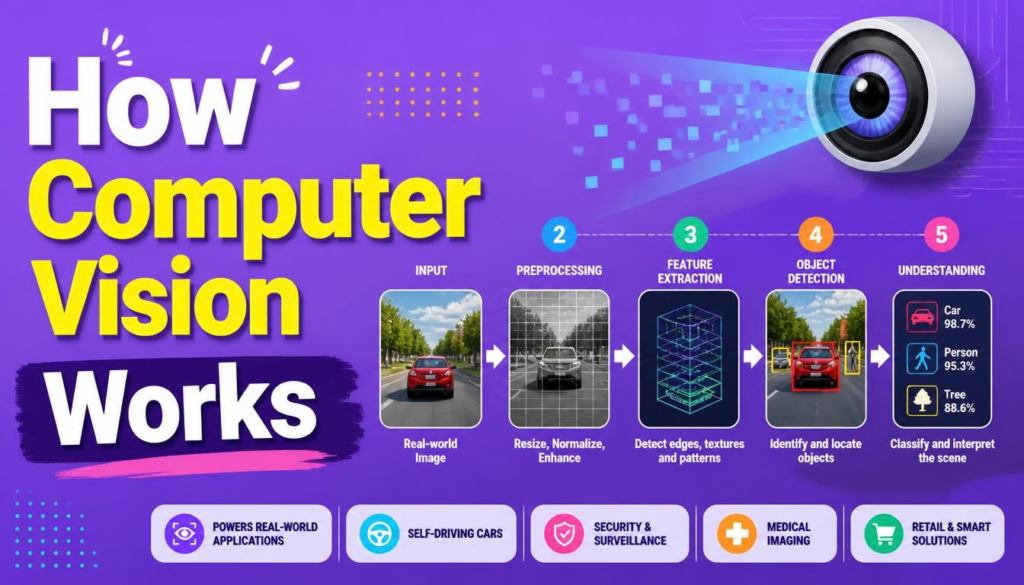
While specific model architectures differ, exploring how computer vision works reveals five distinct processing stages:
┌─────────────────────────────────────────────────────────────┐
│               Computer Vision Data Workflow                 │
├─────────────────────────────────────────────────────────────┤
│ Raw Video/Photos ──> Preprocessing ──> Feature Extraction  │
│                   ──> Model Inference ──> Actionable Output │
└─────────────────────────────────────────────────────────────┘
- Ingesting Visual Data: Systems capture visual feeds from high-speed industrial cameras, mobile sensors, security hardware, medical scans, or satellite feeds.
- Preprocessing & Normalization: Raw visual inputs require cleaning before model ingestion. Preprocessing resizes images, adjusts contrast, filters out sensor noise, crops irrelevant margins, and normalizes pixel distributions.
- Extracting Visual Features: The pipeline analyzes pixel arrangements to locate edges, textures, and color gradients. Modern deep learning networks automate this step by learning visual hierarchies directly from training samples.
- Machine Learning Inference: The processed image passes into a trained model. Analyzing how computer vision works at this stage shows how neural networks generate probability scores (e.g., Vehicle: 96%, Pedestrian: 3%).
- Interpreting Actionable Outputs: The raw prediction converts into business logic—such as flagging a defect on an assembly line or alerting a driver to maintain braking distance.
7 Powerful Secrets to Master Visual AI
To effectively deploy visual intelligence models in production, keep these 7 essential engineering principles in mind:
Secret 1: Leverage Spatial Hierarchies in Neural Networks
Understanding how computer vision works in modern setups requires mastering Convolutional Neural Networks (CNNs). CNNs process visual data through hierarchical spatial filtering:
Raw Pixels ──> Edge Filters ──> Shape Detection ──> Object Assembly ──> Output Class
- Early Layers: Detect simple lines, brightness contrasts, and directional edges.
- Intermediate Layers: Combine basic edges into complex shapes, textures, and object parts.
- Deep Layers: Assemble features into complete objects like faces, vehicles, or industrial parts.
To experiment with open-source tools and build custom image processing pipelines, review the technical tutorials on OpenCV.
Secret 2: Match the System to the Right Vision Task
Selecting the correct architecture is key to project success. When evaluating how computer vision works across tasks, choose accordingly:
- Image Classification: Assigning a global category label to an entire photo (e.g., “Defective Part” vs “Pass”).
- Object Detection: Locating multiple objects within an image using spatial bounding boxes.
- Image Segmentation: Pixel-level partitioning that outlines exact boundaries for medical imaging and self-driving lane detection.
- Optical Character Recognition (OCR): Reading text from scanned receipts, invoices, and shipping labels.
Secret 3: Prioritize Data Augmentation Over Massive Datasets
Models fail when exposed to unfamiliar environments. Rotating, cropping, altering brightness, and injecting noise during training ensures your model generalizes well in real-world lighting.
Secret 4: Bridge the Gap Between Human and Computer Perception
Comparing human sight with algorithmic processing highlights the core mechanics of how computer vision works:
| Feature | Human Vision | Computer Vision |
| Input Source | Biological eyes & optic nerves | Cameras, LiDAR, & digital sensors |
| Context Processing | Uses intuition & common sense | Learns from statistical patterns |
| Adaptability | Adapts instantly to foreign scenes | Requires retrained datasets |
| Execution Speed | Moderate processing speed | High-speed processing across millions of frames |
| Task Scope | Broad generalized perception | Highly optimized for specific tasks |
Secret 5: Optimize Models for Real-Time Edge Computing
Running models on cloud servers can introduce latency. Exporting trained models into lightweight formats (such as ONNX or TensorRT) allows low-latency edge devices like camera modules to run inferences locally.
Secret 6: Solve Edge-Case Failures Early
Engineers studying how computer vision works in real-world production must navigate several operational obstacles:
- Lighting & Lens Flare: Low-light conditions degrade model accuracy without balanced exposure preprocessing.
- Dataset Bias: Models trained on narrow image sets struggle when deployed in foreign geographic locations.
- False Positives: Misclassifications can cause unintended system triggers if automated review steps are missing.
Secret 7: Build Human-in-the-Loop Safeguards
Never leave high-stakes decisions entirely to automation. Designing an operational pipeline that routes low-confidence predictions to human operators guarantees continuous quality control.
Real-World Applications
Seeing how computer vision works across industries demonstrates its versatility:
- Healthcare: Assisting radiologists by flagging anomalies in X-rays, MRIs, and CT scans.
- Autonomous Navigation: Identifying road signs, lane markings, and pedestrians in real time.
- Industrial Manufacturing: Inspecting high-speed assembly line items for scratches or structural flaws.
- Smart Agriculture: Using drone footage to evaluate crop health, monitor irrigation, and target weed treatments.
- Smart Retail: Tracking inventory counts on store shelves and supporting cashierless checkout systems.
If you are looking for more information about how computer vision works , read our recent posts .
Production Blueprint: Automated Quality Control
A manufacturing facility installs an overhead camera on a high-speed conveyor belt to verify package labeling. This system demonstrates how computer vision works in a live production environment:
┌─────────────────────────────────────────────────────────────┐
│               Assembly Line Visual Pipeline                 │
├─────────────────────────────────────────────────────────────┤
│ Camera Capture ──> Crop & Clean ──> CNN Detection           │
│                ──> Valid Label? ──> Pass / Reject Lever     │
└─────────────────────────────────────────────────────────────┘
- Capture: Overhead sensors snap an image as each item passes.
- Preprocessing: Software resizes the image and balances exposure.
- Inference: A CNN verifies label orientation and text legibility.
- Action: Correct items pass through, while misaligned items get flagged for manual review.
Deployment Readiness Checklist
Before launching your visual AI model, verify these key operational steps:
- [ ] Is your visual problem clearly defined based on how computer vision works for your use case?
- [ ] Does your training dataset reflect diverse lighting, angles, and background conditions?
- [ ] Have you benchmarked frame rates and inference speeds on target hardware?
- [ ] Are low-confidence predictions routed to human review queues?
- [ ] Have you set up continuous monitoring to detect model performance drift?
Understanding how computer vision works allows developers, data teams, and business leaders to automate visual workflows safely and efficiently. By combining proper data collection, robust model selection, and human oversight, organizations turn raw pixels into valuable operational insights.
How is your team planning to leverage visual AI models in your workflows this year? Share your technical questions or ideas in the comments below!