15 Best Proven Rules to Protect Your Business Domain from Spoofing (2026)

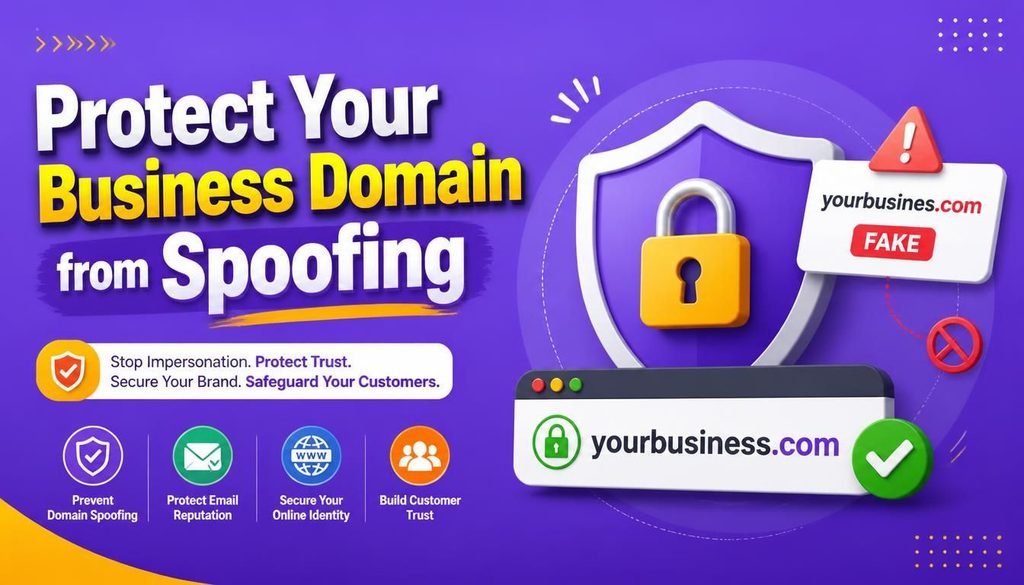
Think about every email going out of your company right now: client invoices, project updates, salary details, and contract proposals. Your business domain name is the digital face of your brand. Clients, suppliers, and partners rely on messages coming from official addresses like sales@yourbusiness.com or billing@yourbusiness.com. Learning how to protect your business domain from spoofing is vital to maintaining these business relationships.
Unfortunately, scammers know how much trust people place in those official addresses. They routinely send fake emails engineered to look as if they came directly from your team.
This attack is known as domain spoofing. When hackers impersonate your company, they hijack your brand reputation to pull off fake invoice scams, divert client payments, or steal sensitive login details. Learning how to protect your business domain from spoofing is no longer just a technical luxury—it is critical for keeping your brand trusted and your revenue secure.
The best part? You don’t need a huge IT budget or a full cyber team to stop attackers in their tracks. By putting simple technical safeguards like SPF, DKIM, and DMARC in place alongside account protections like MFA, you can build a reliable defense system to protect your business domain from spoofing.
Here are 15 actionable rules to protect your business domain from spoofing and keep fraudulent messages out of your clients’ inboxes in 2026.
What Exactly Is Email Domain Spoofing?
Email domain spoofing happens when an attacker modifies the technical header of an email so the message appears to originate from your legitimate company address. Understanding this threat helps you protect your business domain from spoofing.
Because basic email technology (Simple Mail Transfer Protocol, or SMTP) was originally designed without built-in identity verification, anyone can theoretically send an email claiming to be ceo@yourbusiness.com unless modern authentication tools stop them.
┌─────────────────────────────────────────────────────────────┐
│                 Email Domain Spoofing Flow                  │
├─────────────────────────────────────────────────────────────┤
│ Attacker Server ──► Forged Header ──► Recipient Inbox      │
│ (No Authentication Check) ──► Fraudulent Wire Request      │
└─────────────────────────────────────────────────────────────┘
When you do not take steps to protect your business domain from spoofing, scammers use your company’s name for:
- Fake Invoices: Sending updated, fraudulent bank account details to your real customers.
- Credential Harvesting: Sending deceptive security prompts to your employees to steal passwords.
- Executive Impersonation: Pretending to be the CEO and asking finance staff for urgent money transfers.
- Malicious Attachments: Delivering malware disguised as official project documents.
Why Domain Protection Demands Your Attention
If scammers use your domain name to defraud people, major email providers like Google, Microsoft, and Yahoo will quickly mark your domain as untrustworthy.
Once your domain is flagged, your real, daily business emails will start landing straight in your clients’ spam folders. Taking pro-active measures to protect your business domain from spoofing safeguards your deliverability and keeps your business relationship strong.
15 Essential Rules to Protect Your Business Domain from Spoofing
Follow these 15 practical steps to lock down your email environment completely and protect your business domain from spoofing:
Rule 1: Map Out Every Service That Sends Email for You
Before setting up security records, you need a complete picture of every tool sending messages under your brand name. Most growing companies use multiple platforms.
┌─────────────────────────────────────────────────────────────┐
│               Sending Service Mapping Flow                  │
├─────────────────────────────────────────────────────────────┤
│ Core Mail (M365/Google) ──► Marketing ──► CRM & Support     │
└─────────────────────────────────────────────────────────────┘
Common senders often include:
- Main email hosts (Microsoft 365, Google Workspace)
- Newsletter tools (Mailchimp, Brevo)
- Helpdesk software (Zendesk, Freshdesk)
- Invoicing and accounting apps (QuickBooks, Xero)
Failing to list these services first can cause legitimate transactional invoices to fail authentication checks when trying to protect your business domain from spoofing.
Rule 2: Publish an Accurate SPF Record
Sender Policy Framework (SPF) is a simple record added to your DNS settings that explicitly lists which mail servers are permitted to send messages for your domain.
v=spf1 include:_spf.google.com include:sendgrid.net -all
- The
-alltag tells receiving inbox servers to turn away any email originating from servers not listed in your record. - Make sure you publish only one SPF record per domain to avoid technical errors that break your authentication.
- Having multiple SPF entries makes it harder to protect your business domain from spoofing.
Rule 3: Turn On DKIM Key Signing Across All Platforms
DomainKeys Identified Mail (DKIM) attaches an invisible digital signature to your outgoing email headers. Receiving mail systems use a key stored in your DNS to verify that signature.
DKIM confirms that the email came from an authorized sender and wasn’t tampered with along the way. Enforcing DKIM everywhere is a fundamental rule to protect your business domain from spoofing.
Rule 4: Put DMARC Rules to Work
DMARC (Domain-based Message Authentication, Reporting, and Conformance) brings SPF and DKIM together. It instructs receiving email servers on what to do when a message fails verification checks.
┌─────────────────────────────────────────────────────────────┐
│                 DMARC Enforcement Progression               │
├─────────────────────────────────────────────────────────────┤
│ p=none (Monitor) ──► p=quarantine (Spam) ──► p=reject (Block)│
└─────────────────────────────────────────────────────────────┘
Roll out DMARC gradually to protect your business domain from spoofing:
p=none(Monitoring Phase): Observe incoming reports without disturbing delivery.p=quarantine(Stricter Phase): Send failing, suspicious emails directly to spam folders.p=reject(Full Protection): Direct receiving servers to block unauthorized emails completely.
Rule 5: Check Domain Alignment Requirements
Having passing SPF and DKIM checks isn’t quite enough on its own; those checks must align with the visible domain name shown in the user’s “From” line.
If an attacker passes SPF using their own cheap server but puts your company name in the visible address field, DMARC alignment will catch the mismatch and help protect your business domain from spoofing.
Rule 6: Protect All Mailbox Accounts With MFA
While SPF, DKIM, and DMARC prevent impersonation from the outside, multi-factor authentication (MFA) keeps intruders out of real accounts. If an attacker guesses a weak password, they can send malicious messages straight from a legitimate address.
- Require MFA for every staff member without exception.
- Learn step-by-step setup habits in our detailed guide on How to Set Up Two-Factor Authentication.
Rule 7: Restrict Admin Privileges
Limit the number of team members who hold administrator access in Google Workspace or Microsoft 365. Admin accounts have the power to alter DNS entries, create hidden accounts, or change routing settings.
- Separate daily work mailboxes from dedicated administrative logins.
- Enforce strong password guidelines as outlined in our walkthrough on How to Create and Manage Strong Passwords.
Rule 8: Periodically Check Inbox Forwarding Rules
When an attacker gains quiet access to an account, they often set up background forwarding rules to copy sensitive financial emails to external addresses.
Run a quick administrative check every month to audit forwarding rules across all mailboxes and protect your business domain from spoofing.
Rule 9: Secure New Third-Party Tools Promptly
Whenever your company signs up for a new CRM, ticketing system, or marketing tool, make sure your team configures custom SPF inclusions and dedicated DKIM keys before launching email campaigns.
Be sure to remove DNS access entries whenever you stop using an old software platform to properly protect your business domain from spoofing.
Rule 10: Review DMARC Activity Reports
Publishing a DMARC record triggers automated feedback reports from major email providers around the world. These reports highlight every IP address attempting to send mail on your behalf.
Use a simple DMARC dashboard reader to turn raw data into clean charts, helping you quickly spot unauthorized sending attempts.
Rule 11: Train Your Team to Identify Phishing
Technical rules handle the vast majority of threats, but clever scammers sometimes register similar look-alike domains (typosquatting) like your-business.com to bypass standard checks.
- Establish a clear policy to verify financial or wire change requests via a quick phone call.
- Share our operational tips on 10 Best Ways to Spot Advanced Email Phishing Scams to help your workforce stay alert and protect your business domain from spoofing.
Rule 12: Lock Down Your Domain Registrar Account
Your domain registrar (such as GoDaddy, Namecheap, or Cloudflare) manages your master DNS records. If a scammer breaches that account, they can easily wipe out your security records.
- Turn on hardware security keys or strong MFA for your registrar account.
- Turn on domain lock features to prevent unauthorized domain transfers.
Rule 13: Handle DNS Record Changes Carefully
Email verification depends heavily on precise DNS entries. A missing character or typo in an SPF string can temporarily disrupt normal email delivery.
Always double-check new DNS records using free online syntax checkers before making changes live on your domain.
Rule 14: Encrypt Messages in Transit
Keep the contents of your messages secure as they travel between servers by enabling TLS encryption and MTA-STS standards.
Learn more about how cryptographic systems protect data during transmission in our guide on How AES-256 Encryption Works.
Rule 15: Create an Incident Response Guide
Even with strong protections in place, it pays to be prepared. Outline a simple, written plan so your team knows who to contact if an account is compromised or a client receives a suspicious message.
To review broader security protocols across your organization, consult our practical Small Business Cybersecurity Audit Checklist.
Technical Comparison: SPF vs. DKIM vs. DMARC
Here is how these three core protocols work together to protect your business domain from spoofing:
| Feature | SPF Protocol | DKIM Protocol | DMARC Standard |
| Main Function | Whitelists Approved IP Addresses | Applies Cryptographic Signatures | Enforces Rules & Sends Reports |
| Where It Lives | Public DNS TXT Record | Public DNS Key Pair | Public DNS TXT Record |
| Protects Message Content? | No | Yes (Detects Modifications) | Yes (Verifies Domain Alignment) |
| Handles Email Forwarding? | Can fail when forwarded | Passes (Signature stays intact) | Relies on DKIM during forwards |
| Enforcement Policy | Softfail (~all) or Fail (-all) | Pass / Fail Signature Status | p=none, quarantine, reject |
Using all three protocols together creates an effective line of defense to protect your business domain from spoofing.
Common Pitfalls to Watch Out For
Watch out for these frequent mistakes when setting up your email authentication to protect your business domain from spoofing:
┌─────────────────────────────────────────────────────────────┐
│                 Common Email Security Failures              │
├─────────────────────────────────────────────────────────────┤
│ Multiple SPF Records ──► Broken Lookup Limit ──► Open DMARC │
└─────────────────────────────────────────────────────────────┘
- Publishing Two SPF Records: Standard DNS rules allow only one SPF record per domain. Adding a second record causes a syntax error that breaks verification.
- Exceeding 10 DNS Lookups: Including too many external software vendors in your SPF record causes servers to treat it as invalid.
- Staying on
p=noneForever: Leaving DMARC on monitoring mode indefinitely leaves your domain open to impersonation. - Ignoring Unused Subdomains: Scammers sometimes send fake messages from subdomains like
news.yourbusiness.com. Protect subdomains using wildcard rejection rules (sp=reject).
For web infrastructure security tips, check out our guide on 10 Best Free Ways to Protect Your WordPress Website From DDoS Attacks.
Domain Spoofing Protection Checklist
Use this practical checklist to keep track of your progress and protect your business domain from spoofing:
| Security Action | Task Description | Status |
| Sender Inventory | List all primary, marketing, and support email software | ☐ |
| SPF Setup | Ensure a single SPF record ending in -all is active | ☐ |
| DKIM Setup | Turn on DKIM signing across all external sending tools | ☐ |
| DMARC Record | Publish a baseline DMARC record (p=none to start) | ☐ |
| DMARC Alignment | Confirm visible sender addresses match authenticated domains | ☐ |
| MFA Protection | Turn on multi-factor authentication for all team mailboxes | ☐ |
| Registrar Security | Enable domain locks and MFA on your DNS host account | ☐ |
To explore fundamental infrastructure concepts further, read our introductory guide to Network Security Basics.
Final Thoughts
Learning how to protect your business domain from spoofing isn’t a complex, one-time overhaul—it is simply a set of good operational habits. As your team adopts new cloud software and brings on new hires, your sending environment naturally changes.
Take 5 minutes today: run a quick check on your DNS records, confirm your SPF string is accurate, and start monitoring DMARC reports to protect your business domain from spoofing in 2026. Getting these basic safeguards in place ensures that when clients see an email from your brand, they can trust it completely.
Frequently Asked Questions (FAQs)
How can I protect my business domain from spoofing for free?
You can protect your business domain from spoofing for free by creating SPF, DKIM, and DMARC TXT records inside your existing domain management dashboard. Almost all DNS providers and email services include these features at no extra charge.
What happens if I have two SPF records on one domain?
If you publish two separate SPF records, receiving mail servers will flag both as invalid (PermError). This turns off SPF verification and makes it harder to protect your business domain from spoofing. Combine all approved sending IPs into one single SPF string instead.
Will setting DMARC to p=reject block my real business emails?
It will only affect legitimate emails if those sending platforms were not set up with SPF or DKIM beforehand. Start with p=none first, review your automated reports to verify all authorized senders, and then update to p=reject to effectively protect your business domain from spoofing.
How long do DMARC DNS updates take to work?
DNS updates usually take effect globally within 24 to 48 hours, depending on your domain host’s TTL (Time-To-Live) settings.
What Is Your Email Protection Setup?
Has your organization set up SPF, DKIM, and DMARC yet, or have you ever spotted a suspicious email pretending to come from your brand? What steps are you taking to protect your business domain from spoofing? Share your experiences, questions, or tips in the comments below!