How Does VPN Encryption Work? Best Proven Privacy Guide (2026)

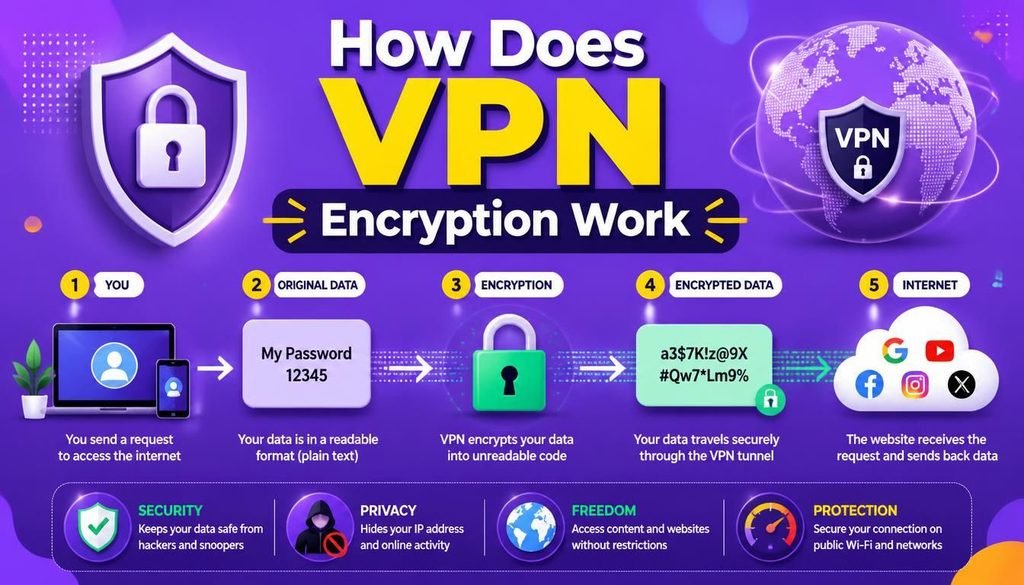
When you browse the web without a Virtual Private Network (VPN), your phone or laptop talks directly to websites through your Internet Service Provider (ISP). Your ISP sees every single web domain you open, and those websites see your home IP address and general location. Learning how does VPN encryption work is the first step toward reclaiming your digital privacy.
A VPN changes this connection completely by placing an encrypted shield between your device and the internet. But how does VPN encryption work, and does using one actually make you invisible online?
The practical answer: a VPN gives you a huge boost in privacy, especially on risky public Wi-Fi networks. However, it isn’t a magic cloak. Websites, tracking scripts, active account logins, and browser tracking can still identify you if you aren’t careful.
Understanding how does VPN encryption work helps you clear away the marketing hype, use your VPN properly, and keep your online habits genuinely secure in 2026.
What Is a VPN and How Does It Re-Route Traffic?
Think of a VPN (Virtual Private Network) as a secure middleman standing between your phone or computer and the rest of the web. Understanding this setup helps explain how does VPN encryption work to safeguard your daily browsing.
Without a VPN active, your connection goes straight out in the open:
┌─────────────────────────────────────────────────────────────┐
│                 Unprotected Connection Path                 │
├─────────────────────────────────────────────────────────────┤
│ Your Device ──► ISP (Visible Activity) ──► Target Website  │
└─────────────────────────────────────────────────────────────┘
When you turn a VPN on, your web request takes a secure detour:
┌─────────────────────────────────────────────────────────────┐
│                 Encrypted VPN Connection Path               │
├─────────────────────────────────────────────────────────────┤
│ Your Device ──► Encrypted Tunnel ──► VPN Server ──► Website │
└─────────────────────────────────────────────────────────────┘
Instead of a website recording your actual home IP address, it only sees the public IP address of the VPN server node you selected.
Everyday Benefits of VPN Routing:
- Scrambling your data so local snoops on public Wi-Fi can’t read it.
- Hiding your home IP address from every site you visit.
- Keeping your web browsing private from your internet provider.
- Adding a solid layer of defense against basic network tracking.
- Accessing your home accounts safely while traveling abroad.
How Does VPN Encryption Work? (Step-by-Step Breakdown)
To visualize how does VPN encryption work, imagine putting a sensitive paper document inside an armored steel box before handing it to a courier. Anyone who handles the box can see it is moving from one building to another, but only the person holding the matching key can open the lid and read what is inside.
Encryption simply scrambles your data into unreadable code before it leaves your device. Here is the step-by-step reality of how does VPN encryption work behind the scenes:
┌─────────────────────────────────────────────────────────────┐
│                 VPN Encryption Handshake Flow               │
├─────────────────────────────────────────────────────────────┤
│ Client Request ──► Key Exchange ──► Encrypted Tunnel Active │
└─────────────────────────────────────────────────────────────┘
1. Connection Request and Handshake
When you tap “Connect” in your VPN app, your device reaches out to the VPN server to do a quick “handshake.” Both systems use digital certificates to verify each other’s identity so you don’t accidentally connect to a fake server.
2. Setting Up the Secret Encryption Keys
Next, your app and the server generate temporary secret keys using smart cryptography. These keys act as the digital locks. Only your device and the specific VPN server hold these matching keys for your session.
Most modern VPNs rely on battle-tested encryption methods like AES-256 or ChaCha20. To see how these mathematical ciphers turn plain text into unreadable code, check out our straightforward guide on How AES-256 Encryption Works.
3. Tunneling and Encapsulating Your Data
Once the connection is locked, your internet traffic enters what experts call the “VPN tunnel.” Your app takes your original data packets, scrambles them, and wraps them inside an outer layer of code (encapsulation).
If someone on the same public network intercepts your traffic, all they see is useless, scrambled gibberish moving toward a single IP address. Knowing how does VPN encryption work ensures you understand why bad actors on open networks fail to steal your sensitive data.
4. Decrypting and Delivering the Request
When those scrambled packets reach the VPN server, the server uses its matching key to unlock the data. It then sends your request to the website you wanted to open. The website responds back to the VPN server, which scrambles the response and sends it safely back down the tunnel to your screen.
What Information Does VPN Encryption Actually Hide?
Learning how does VPN encryption work also means understanding where its protection starts and stops.
| Observer Type | Without a VPN | With an Active VPN |
| Public Wi-Fi Host | Can see visited sites and unencrypted data | Sees only unreadable ciphertext going to one IP |
| Your ISP | Sees your full browsing history and requests | Sees only that you are connected to a VPN IP |
| Visited Websites | Sees your real IP address and rough location | Sees the VPN server’s IP address and location |
| Cybercriminals (Same Wi-Fi) | Can steal open data, cookies, or cleartext logins | Cannot read your encrypted traffic |
Understanding how does VPN encryption work ensures you know which threats are blocked and which ones require extra vigilance.
Does a VPN Really Make You Anonymous Online?
A lot of VPN marketing promises complete invisibility, but understanding how does VPN encryption work clears up this common misconception.
Here is the truth: Privacy is not the same as anonymity.
A VPN gives you privacy by hiding your web traffic contents and your real IP address from local onlookers. But anonymity means nobody can trace your actions back to you under any circumstances. Knowing how does VPN encryption work helps you realize why a VPN alone cannot guarantee total anonymity for three simple reasons:
┌─────────────────────────────────────────────────────────────┐
│                 Anonymity Breakdown Vectors                │
├─────────────────────────────────────────────────────────────┤
│ User Account Logins ──► Tracking Cookies ──► Fingerprinting │
└─────────────────────────────────────────────────────────────┘
1. Signing Into Accounts Instantly Identifies You
If you turn on an encrypted VPN and then log into your email, bank, or shopping account, that platform knows exactly who you are. The VPN masks your location, but your login credentials tell the platform who is sitting behind the screen.
2. Web Browsers Track You With Cookies and Fingerprints
Modern websites use tracking cookies, local storage scripts, and browser fingerprinting (checking your screen resolution, installed fonts, and browser extensions) to recognize your device across the web. Changing your IP address with a VPN doesn’t clear away these hardware tracks.
3. You Still Need to Trust Your VPN Provider
Using a VPN stops your ISP from watching your web activity, but it transfers that trust over to your VPN provider. If a shady provider logs your activity, your history could still be exposed. That is why picking an audited, strict no-logs provider is so important.
Understanding VPN Protocols (In Plain English)
A VPN protocol is simply the set of technical rules that controls how your encrypted tunnel is built and maintained. When exploring how does VPN encryption work, different protocols give you different mixes of speed, security, and stability.
┌─────────────────────────────────────────────────────────────┐
│                 Modern VPN Protocols Standard               │
├─────────────────────────────────────────────────────────────┤
│ OpenVPN (Reliable) ──► WireGuard (Fast) ──► IKEv2 (Mobile)  │
└─────────────────────────────────────────────────────────────┘
- WireGuard: A fast, lightweight protocol built on modern cryptography. It is quick to connect, easy on mobile phone batteries, and great for daily use.
- OpenVPN: The reliable open-source standard used for decades. It is highly configurable and works great across almost every device type.
- IKEv2/IPsec: Excellent for smartphones because it reconnects instantly when you switch between mobile data and home Wi-Fi networks.
To learn more about setting up a safe overall home setup, read our simple guide on Network Security Basics.
Why VPN Encryption Matters on Public Wi-Fi
Free public Wi-Fi at coffee shops, airports, and hotels is notoriously easy to abuse. Bad actors can easily set up fake hotspots (Evil Twin attacks) or use packet-sniffing tools to grab open data floating across the room.
Knowing how does VPN encryption work highlights why using one on open networks is a no-brainer: even if a bad actor manages the Wi-Fi router, your encrypted tunnel keeps your actual data secure and unreadable.
Of course, a VPN is just one piece of your safety habits. You should also:
- Protect your logins by following our tips on How to Create and Manage Strong Passwords.
- Add an extra lock to your accounts with our walkthrough on How to Set Up Two-Factor Authentication.
Can a VPN Protect You From Every Cyber Threat?
No. A dangerous myth is that turning on a VPN makes your device immune to malware, scams, and dangerous downloads.
┌─────────────────────────────────────────────────────────────┐
│                  What a VPN CANNOT Stop                     │
├─────────────────────────────────────────────────────────────┤
│ Phishing Attacks ──► Malware Downloads ──► Stolen Passwords │
└─────────────────────────────────────────────────────────────┘
A VPN encrypts the pipeline your data travels through, but it doesn’t clean or scan the files you choose to download. Even when you understand how does VPN encryption work, remember that a VPN won’t stop:
- Phishing Scams: If you get tricked into typing your password on a fake website, a VPN will not prevent that scam from working. Learn how to spot fake messages using our guide on 10 Best Ways to Spot Advanced Email Phishing Scams.
- Malware Infections: Downloading a dangerous attachment drops malware right onto your device, regardless of encryption. If you suspect your system has an infection, check our breakdown on What Is Malware and How to Completely Remove It.
- Social Engineering Scams: Scammers tricking you into sharing confirmation codes over SMS or phone calls.
Essential VPN Features to Double-Check
Before picking a VPN service, make sure its app includes these crucial features that complement how does VPN encryption work:
- Kill Switch: Automatically cuts off your internet if the VPN drops unexpectedly, so unencrypted data never leaks by accident.
- DNS Leak Protection: Ensures your website address lookups travel through the encrypted VPN tunnel instead of sneaking out through your normal ISP connection.
- Audited No-Logs Policy: Confirms that an independent security firm has verified the provider does not keep logs of what you do online.
- Split Tunneling: Lets you send sensitive browser traffic through the VPN while allowing latency-sensitive tools (like local banking apps or online games) to connect directly.
Common VPN Myths vs. Realities
| Common Myth | Real-World Reality |
| “A VPN makes me completely invisible online.” | False: It hides your IP and encrypts transit, but account logins and cookies still track you. |
| “All VPN providers protect your privacy equally.” | False: Free or shady VPNs often record your browsing data to sell it to ad networks. |
| “A VPN replaces traditional antivirus software.” | False: A VPN protects your connection pipeline; antivirus scans files on your device. |
| “VPN encryption slows your internet to a crawl.” | False: Modern protocols like WireGuard usually cause barely noticeable speed drops on decent connections. |
Quick VPN Privacy Checklist
Use this simple checklist to keep your connection locked down:
| Security Domain | Practical Action Item | Done? |
| Provider Selection | Pick an independently audited no-logs VPN provider | ☐ |
| Protocol Choice | Set app settings to use WireGuard or OpenVPN | ☐ |
| Kill Switch | Enable the automatic Kill Switch feature inside your app | ☐ |
| Leak Testing | Run an online DNS leak test to make sure your IP is hidden | ☐ |
| Browser Clean-up | Clear tracking cookies regularly and use an ad-blocker | ☐ |
| Account Security | Turn on multi-factor authentication for important accounts | ☐ |
Final Thoughts
Understanding how does VPN encryption work shows you why Virtual Private Networks are so useful, along with where their limits lie. By sending your web traffic through an encrypted tunnel, a VPN protects your personal data from local snoops, untrusted Wi-Fi risks, and unwanted ISP tracking.
Just remember that learning how does VPN encryption work is only part of the equation. Real digital privacy comes down to combining smart tools—like encrypted connections, strong passwords, multi-factor authentication, and safe browsing habits—every time you log on.
Frequently Asked Questions (FAQs)
How does VPN encryption work in simple terms?
In simple terms, how does VPN encryption work is by taking your web data, scrambling it into unreadable code using secret mathematical keys, and sending it through a secure tunnel to a remote server. The remote server unlocks the data and sends it to your destination website, hiding your real home IP address along the way.
Can your ISP see what you do when using a VPN?
No. When your VPN is turned on, your ISP can only see that your device is connected to a specific VPN server address, along with how much data you transfer. Learning how does VPN encryption work helps you understand why your ISP can no longer log individual web pages you open.
Does a VPN hide browsing history from network admins or landlords?
Yes. Because the VPN app encrypts your data right on your device before sending it to the Wi-Fi router, network owners and admins can only see encrypted packets heading toward a single VPN server.
Can you still be tracked online while using a VPN?
Yes, tracking can still happen through other channels. While a VPN masks your IP address, websites can still track you if you log into personal user accounts, accept tracking cookies, or leave identifiable browser fingerprints active on your device. Understanding how does VPN encryption work helps you take extra browser precautions.
What Is Your VPN Setup?
Now that you know how does VPN encryption work, do you run a VPN regularly on your phone or laptop, or are you looking to set one up for the first time? What features matter most to you? Share your thoughts and questions in the comments below!